
Business

Why Should We Go For A Website?

The Importance and Purpose of Websites in the Modern World

By Author – Prankul Sinha

In today’s digital era, having a website is one of the easiest and most effective ways for any business to showcase and advertise its products. A well-designed website not only displays products beautifully but also helps a company build a strong relationship with its customers. It serves as a powerful online presence where customers can easily learn more about your offerings and even make purchases directly.

When a business has its own website, it experiences significant growth. A good website design attracts more visitors, which often leads to an increase in sales. Moreover, it allows business owners to track company performance conveniently from their phones or laptops — anytime, anywhere.

Websites are also useful for hiring. If a company is looking to recruit new employees, it can simply post job openings on its website, making it easy for potential candidates to apply online.

Websites in Education

In today’s world, schools and colleges are also relying heavily on websites. They use them not only to promote their institutions but also to manage many daily activities. Students can pay their fees through online portals, check announcements about events, and stay updated on all school or college activities.

Thus, the purpose of a website varies depending on the need — from business promotion to e-commerce, education, and entertainment. Below are a few examples:


1. The Purpose of E-Commerce Websites

The primary goal of e-commerce websites is to sell products online. Successful e-commerce sites are optimized to increase conversions — ensuring visitors make purchases with ease.

To achieve this, such websites use modern design and marketing strategies, smooth navigation, fast checkout systems, and multiple secure payment options. Reducing friction during the shopping process helps build customer trust and boosts sales.


2. The Purpose of Service-Based Business Websites

Service-based business websites aim to convince visitors to become customers. They build credibility by presenting the company as professional, experienced, and reliable.

Before reaching out, customers often review websites to evaluate a company’s expertise, reputation, and service quality. Including client testimonials, visual portfolios, and informative articles helps build trust and demonstrate authority in the field.

A well-structured service-based website ensures potential clients feel confident about choosing that company over others.


3. The Purpose of Social Media Websites

The main purpose of social media websites is to connect people — friends, families, and communities — allowing them to share photos, videos, and experiences.

However, social networks are not limited to personal use. Businesses use social platforms to build direct relationships with their customers, receive valuable feedback, and understand what their audience truly needs and expects.


4. The Purpose of Entertainment Websites

Entertainment websites are designed to engage and amuse visitors. These may include online magazines, celebrity news portals, sports updates, movies, humor, and more.

To keep users returning, these sites are updated frequently and offer interactive content such as videos, podcasts, and slideshows. An engaging entertainment website provides a fun and refreshing online experience for its audience.


Conclusion

In short, websites play an essential role in every field — from business and education to entertainment and social connection. They have become the digital face of modern organizations, helping them grow, communicate, and connect with the world more effectively.

Having a well-designed and functional website is no longer a luxury — it’s a necessity for anyone who wants to succeed in today’s fast-paced digital world.

Search Engine Optimization

By Author – Prankul Sinha


Introduction

Search Engine Optimization, commonly known as SEO, is the process of increasing traffic to a website through organic or natural search results on search engines. Popular search engines like Google, Yahoo, and Bing display search results in a ranked order — and the higher your page ranks, the more visibility your site receives.

A well-optimized website has better chances of appearing among the top 10 search results. SEO involves improving the website’s content, HTML structure, and coding to make it more relevant to specific keywords while ensuring that there are no barriers to search engine indexing.

Another major part of SEO is link building, which involves increasing the number of backlinks (inbound links from other websites). These backlinks act as endorsements for your website, signaling to search engines that your content is credible and worth ranking higher.


Types of SEO

SEO can be broadly divided into two main categories:

  1. On-Page SEO

  2. Off-Page SEO


On-Page SEO

On-Page SEO refers to all the techniques and settings that can be implemented directly on your website to improve its search engine ranking.

This includes optimizing content with keywords, using meta tags and meta descriptions, improving internal linking, creating a customized URL structure, adding alt text to images, and ensuring high-quality, valuable content for users.


Types of On-Page SEO

1. Backlinking

Backlinking plays a major role in establishing authority and credibility. When you link to reliable and high-ranking websites, search engines like Google consider your website more trustworthy.

Creating multiple backlinks to authoritative sites can also increase the likelihood of earning reciprocal backlinks, meaning those sites might link back to you in the future. This exchange of links significantly improves your website’s traffic and search visibility.


2. Meta Description

A meta description is the short piece of text that appears below your website’s title on search engine result pages (SERPs).

This description helps users understand what your page is about and determines whether they click on your link or move on to another result. A strong, clear, and keyword-rich meta description can greatly improve your click-through rate (CTR) and overall search ranking.


3. Image SEO

Images are an essential part of a website, but they also need to be optimized for SEO. Image SEO ensures that your images appear in Google Image Search results, bringing in additional traffic to your website.

When a user clicks on an optimized image, they are redirected to your site — generating potential leads. To achieve this, make sure to:

  • Use descriptive filenames

  • Add relevant alt attributes

  • Compress images for faster loading times

Well-optimized images improve both user experience and search engine ranking.


Off-Page SEO

Off-Page SEO involves activities performed outside your website to enhance its authority, popularity, and trustworthiness. These actions signal to search engines that your website is valuable and credible.

Here are some key off-page SEO techniques:


1. Sharing Content

Creating valuable content is only half the job — sharing it is equally important. Posting your blogs or updates on social media platforms, forums, and other online communities can significantly increase visibility.

Your friends, followers, or professional connections may further share your post, expanding your reach exponentially. If your content is relevant and interesting, it has the potential to go viral and drive huge traffic to your website.


2. Likes and Star Ratings

The number of likes, shares, and ratings your content receives also impacts your SEO.

When a post gains positive ratings or reviews, it signals credibility and trustworthiness to both your audience and search engines like Google. In particular, star ratings act as a form of online review — improving user perception and ranking power.


3. Answering Queries and Being Responsive

Engagement is the heart of off-page SEO. When your audience leaves comments or questions, it shows they are genuinely interested in your content.

By responding promptly and helping users, you build trust and deepen engagement. This responsiveness not only improves customer relationships but also enhances your brand image and online reputation.


4. Understanding User Intent

Knowing what your audience is looking for is essential for successful SEO. Spend time researching trending topics, user preferences, and market demand before publishing new content.

By addressing your target audience’s interests and needs, you can generate more engagement, improve dwell time, and establish your website as a reliable information source. Staying updated with the latest industry trends also gives you a competitive advantage.


5. Building a Personal Connection

Off-Page SEO is not just about technical tactics — it’s also about building relationships.

Engage with your readers on social media, reply to their comments, and maintain a friendly tone. The more you interact personally, the more familiar and connected your audience will feel with your brand. This emotional connection can transform one-time visitors into loyal followers and customers.


Conclusion

Search Engine Optimization is much more than just ranking higher on Google — it’s about creating value, trust, and meaningful engagement.

By mastering both On-Page and Off-Page SEO techniques, businesses can dramatically increase their visibility, traffic, and credibility online. Whether it’s optimizing your meta tags, improving backlinks, or connecting personally with your audience, SEO remains one of the most powerful tools for sustainable digital growth.

Smart Note Taker

Smart Note Taker :-

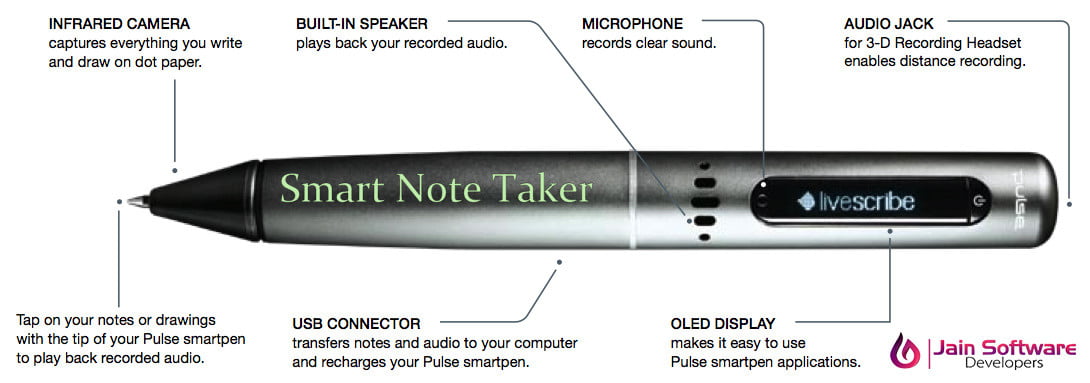
The Smart Note Taker is such a helpful product that satisfies the needs of the people in today’s technological and fast life. This product can be used in many ways. The Smart NoteTaker provides taking fast and easy notes to people who are busy with something else. With the help of Smart NoteTaker, people will be able to write notes on the air, while being busy with their work

The written note will be stored on the memory chip of the pen and will be able to read in digital medium after the job has done. This will save time and ease life. The smart note taker is good and helpful for blinds that think and write freely. Another place, where this product can play an important role, is where two people talks on the phone. The subscribers are apart from each other while their talk and they may want to use figures or texts to understand themselves better. It’s also useful especially for instructions in presentations.

The instructors may not want to present the lecture in front of the board. The drawn figure can be processed and directly sent to the server computer in the room. The server computer then can broadcast the drawn shape through network to all of the computers which are present in the room. By this way, the lectures are aimed to be more efficient and fun. This product will be simple but powerful. The product will be able to sense 3D shapes and motions that user tries to draw. The sensed information will be processed and transferred to the memory chip and then will be monitored on the display device. The drawn shape then can be broadcasted to the network or sent to a mobile device.

“Technology is the best when it brings people together”

Technical Definition of Smart Note Taker:-

In order to meet the technical requirements of the product we need Operating System Like Windows or Linux in order to implement software part of the project, Displacement Sensors to recognize the displacement of the pen in three dimensions, parallel cable to communicate with computer, software to solve the displacement data and finds the individual coordinate displacements in three axes and transform the data into text format, analog to digital converter to process analog displacement data and convert them into digital format, switch to control the pen and Rechargeable battery.

  • Analog to digital converter
  • Software program to convert data into text or string format
  • Operating System ??Parallel cable
  • Switch
  • Rechargeable battery
  • Displacement Sensor

“It’s Not faith in technology, It’s Faith in People

Note Taker for PC:-

PC Notes Taker is the world’s first device that captures natural handwriting on any surface onto a PC in real time. Based on a revolutionary electronic pen, PC Notes Taker displays the user’s handwritten notes, memos or drawings on the computer, and stores the image for future use. PC Notes Taker is ideal for markets where the handwritten input is essential, such as health, educational and financial sectors. Supplied with user-friendly software, PC Notes Taker is compatible with PCs and notebooks.

Adds Handwriting Input to any Computer PC Notes Taker is the world’s first device that captures natural handwriting on any surface onto a PC in real time. Based on a revolutionary electronic pen, PC Notes Taker displays the user’s handwritten notes, memos or drawings on the computer, and stores the image for future use. PC Notes Taker is ideal for markets where the handwritten input is essential, such as health, educational and financial sectors. Supplied with user-friendly software, PC Notes Taker is compatible with PCs and notebooks.

Features:-

Capture of handwriting from any plain paper or other writing surface Input of continuous writing up to A4 page size Insert sketches, signatures, equations, and notes into Word documents E-mail sketches or handwritten notes in any language using MS OUTLOOK Convert handwriting to digital text using MS word recognition engine Annotate, add comments, edit and draw in your own handwriting onto MS office documents Create instant messaging using ICQ

The Smart Pen system includes the Smart Pen and a pen cradle connected to an internet-enabled computer. As CRFs are filled out, the Smart Pen records each stroke. It identifies each CRF and where it is on the page through a very fine grid pattern that appears as a light gray background shading on the CRF. The Pen is then placed in the cradle, activating a password-protected Internet link to Health Decisions. Data are interpreted into fields and validation can occur immediately, with queries returned to sites quickly over the Internet. The process also creates an exact copy of the original CRF that can be read for notation and comparison with interpreted data fields. Health Decisions takes the best technology and applies it to your clinical trials.

“In Technology Whatever can be done will be done”

Note Taker for mobile:-

The Ultimate Handwriting Capture Device Mobile NoteTakerTM is the worlds first portable handwriting capture device based on natural handwriting as an input. Attach plain paper of any kind and use the Pegasus electronic pen to capture, store and share handwritten drawings, sketches, notes, and memos at meetings, lectures, and conferences.

Mobile NoteTakerTM has a built-in LCD to confirm input. The on-board flash memory can store up to 50 pages.

Features:-

Uses standard paper – no special paper required Stores up to 50 A4 pages Includes LCD to view and confirm input Operates both in mobile mode and when connected to PC, notebook or other device Connects to PC/Notebook via USB cable (included) Includes software for synchronization and management of stored files Writes directly into MS Office applications (in Connected mode) Allows file transfer over LAN, email, and instant messaging application (in connected mode).

Capture, Organize, and Share Your Notes Digitally-Anywhere, Anytime!
Mobile Mode Enables capture and storage of notes and sketches digitally at meetings, lectures, and conferences.

“Because People who are crazy enough to think they can change the world are the ones who do”

Connected Mode

Synchronizes the Mobile NoteTakerTM and a PC/Notebook via USB cable (included). You can upload, organize, move, edit or add to handwritten notes, ideas, sketches, phone numbers, or reminders. The included software also enables memos, notes, and sketches to be sent via e-mail or over the LAN network. It is also possible to write directly into MS Word or Outlook, and add a personal touch to ICQ instant messages. Based on Pegasus successful PC Notes Taker, Mobile NoteTakerTM is the ultimate handwriting capture device. Everything you need to get started is right in the box. Even if you dont have standard size paper or piece of paper with you-you can use anything – an envelope, an old receipt, a tear-off from a paper bag and best of all in your own natural and writing.

As long as you have the Mobile NoteTakerTM, you can jot down your most inspired ideas and be sure that you will never lose them again.

Pill Camera

What is wireless capsule enteroscopy (Pill Camera)?

Wireless capsule enteroscopy also known as pill cam is a relatively new method of diagnosing diseases within the?small intestine.

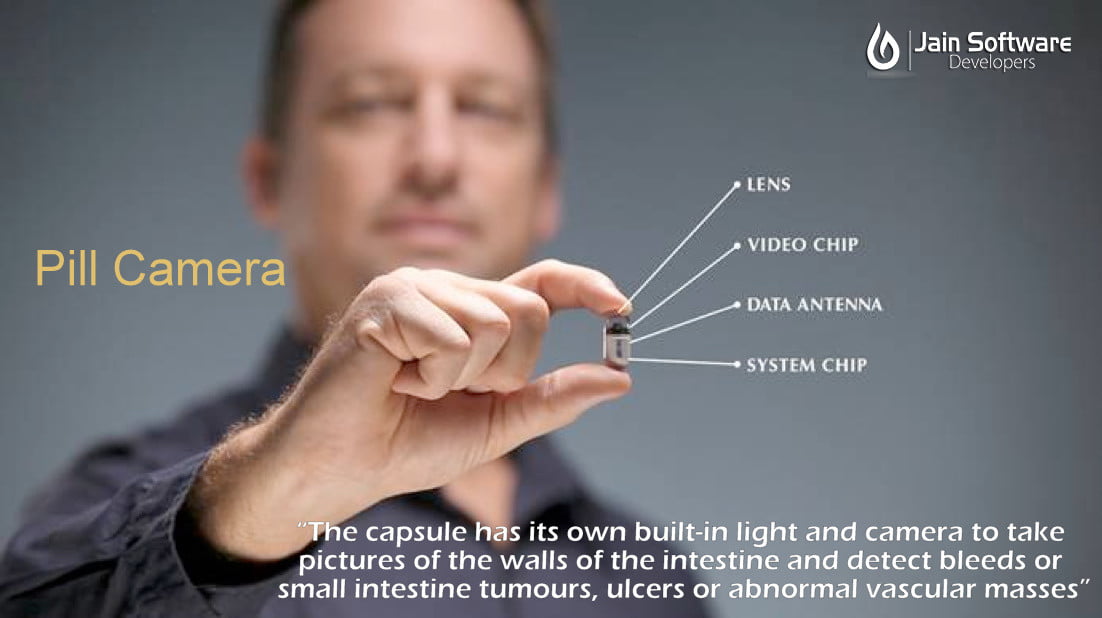
For detecting diagnosis a pill-sized video capsule is swallowed, which slowly travels through your intestine before being naturally excreted. The capsule has its own built-in light and camera to take pictures of the walls of the intestine and detect bleeds or small intestine tumors, ulcers or abnormal vascular masses. 2-4 images are taken per second for up to 8 hours. The images are transmitted to a recorder that is worn around the waist.

You may require this investigation if you have abnormal bleeding or are suspected to have Crohn’s disease. This investigation is non-invasive and allows doctors to examine all three portions of the small intestine

  • Duodenum,
  • Jejunum and
  • Ileum

which often cannot be reached by other imaging methods.
What is Capsule Endoscopy used for?

Capsule enteroscopy allows your doctor to visualize the small intestine which is often missed by conventional imaging methods such as upper gastrointestinal endoscopy or colonoscopy. The most common reason for ordering this investigation is to look for sources of bleeding. You may have noticed blood in yo ur vomit or faeces, or have unnoticed blood loss that can cause iron deficiency anaemia. This investigation can identify polyps, inflammatory intestine disease (Crohn’s disease or?ulcerative colitis), ulcers and tumors that may be the source of the bleeding. Such lesions may not have been found by previous investigations but once identified; your doctor can decide an appropriate course of management.

The other main use is for evaluating the extent of Crohn’s disease, which commonly affects the small intestine. This investigation is particularly useful for detecting early disease which may be missed by barium examination and CT. Also, it can be useful in patients who have symptoms which do not match the extent of disease (if any) seen by conventional imaging techniques.

Wireless capsule enteroscopy may have further indications in the future as it is safe, easy to perform, non-invasive and doesn’t require sedation. In particular, if techniques are invented that allow treatments or biopsies (tissue sampling) to be performed at the time of the procedure, it will become a very useful procedure.

It should be noted that this investigation may not always be the best for you. The images taken by the camera are of poorer quality than those obtained by upper gastrointestinal endoscopy or colonoscopy. In addition, the camera may move too fast or slow to examine or the appropriate areas or be facing the wrong way and miss some lesions. Thus, it is only one possibility?of a series of investigations you may require in order for your doctor to make a correct diagnosis.
How do you prepare for the procedure?

Prior to the procedure, your doctor will explain what the procedure involves, risks, benefits and why it is indicated in your case. You will need to fast (don’t eat or drink) for around 10 hours before the investigation, as it is safest and produces the best results when the intestine is empty.

No fluid is taken for at least 2 hours and no food for a further 4 hours after swallowing the capsule. Oral medications can be taken after 2 hours if required.

If you are diabetic, the medication must be stopped during the fasting period and insulin use should be discussed with your doctor.

There is usually no need for intestine preparation, but strong colored tablets (e.g. iron tablets) should be avoided for about 24hrs before the procedure.
What does the procedure involve?

For the procedure, you will be required to swallow a 26x11mm endoscopy capsule equipped with a video camera, light source, radio transmitter, and batteries. The capsule is swallowed with a substance called simethicone, to prevent bubbles forming and interfering with the images.

The capsule passes naturally through your body via peristalsis (contraction and propelled by the muscular walls of the gastrointestinal tract) while it takes many images. The images are detected by a sensor device attached to your abdomen with 8 small aerials taped to the skin (similar to the electrodes used for an ECG). These are recorded and stored on the image recorder worn around your waist.

After approximately 8 hours you will be required to return to the medical center so the images can be downloaded and examined on a computer monitor by the physician. Around 50,000 images will be taken per investigation, so it can take a long time for these to be examined and processed. Your doctor will normally inform you of the results within a week.

You should pass the capsule naturally after 8-72 hours, but it can sometimes take up to two weeks. If you haven’t passed the capsule by this time, an X-ray may need to be performed to see if it is still present or obstructed. The capsule is discarded after it has been excreted.
What are the risks?

Capsule enteroscopy is a safe procedure and is well tolerated by most patients. Less than 1 in 10 people have difficulty swallowing the capsule, which has a gel coating to help you swallow it.

The main risk is retention of the capsule, which occurs in about 1 in a hundred people. The capsule becomes impeded by a stricture (narrowing) secondary to a tumor, inflammation or scarring from previous surgery. It is not dangerous in the short term, but you may require a surgical intervention to remove it. Obstruction may present as bloating, vomiting or pain. You should consult your doctor promptly if you experience these symptoms. In most cases, the capsule will pass naturally from the body without any problems.


Generic Visual Perception Processor

Introduction

The Generic Visual Perception Processor (GVPP) is an advanced single-chip system inspired by the human brain’s visual perception capabilities. Designed to detect, locate, and track objects in real time from motion video signals, GVPP imitates the neural networks of the human eye and brain.

This electronic “eye” is capable of processing approximately 20 billion instructions per second (BIPS) — a remarkable achievement that allows it to handle complex visual tasks such as object detection, movement tracking, and environmental perception with exceptional accuracy.


How GVPP Works

The GVPP functions by analyzing a continuous stream of visual information — much like the human visual system. It processes incoming video signals, converts them into digital information, and extracts meaningful data such as object position, shape, and velocity.

By modeling both the temporal (time-based) and spatial (location-based) functions of the human eye-brain system, the GVPP views its surroundings as a dynamic series of histograms that represent object locations and movements.

It is equipped with advanced capabilities like:

  • Automatic adaptation to object size, orientation, and lighting changes.

  • Real-time object tracking, even under varying light conditions.

  • Learning-in-place capability — allowing it to improve performance without reprogramming.

This means GVPP can function seamlessly in daylight or darkness, adapting to real-world conditions much better than most traditional vision systems.


Applications of GVPP

Because of its ability to perceive and interpret visual data like humans, the GVPP can be used in a wide range of fields, such as:

  • Autonomous driving systems – recognizing and tracking vehicles, pedestrians, and obstacles.

  • Agriculture – selecting ripe fruits or identifying plant diseases.

  • Industrial automation – performing tasks that require visual precision.

  • Security and surveillance – detecting unusual movements or activities.

  • Robotics – enhancing the perception abilities of humanoid or industrial robots.

While GVPP imitates human visual processing, it is not designed as a medical device — meaning it cannot cure blindness or replace biological vision. However, its role in machine vision is revolutionary.


Overcoming the Limitations of Traditional Processors

For decades, computing technology has faced limitations due to the design of traditional processors. These processors work by breaking down complex tasks into smaller, simpler steps that follow a strict algorithmic structure.

However, many real-world problems do not have a clearly defined algorithm — making traditional processors inefficient or incapable of handling them.

This is where GVPP’s neural learning architecture makes a breakthrough. By mimicking how the human brain learns and adapts, GVPP can:

  • Process information without needing a fixed algorithm.

  • Learn and adapt from real-time data.

  • Handle unpredictable or undefined input patterns effectively.

This neural learning model makes GVPP highly fault-tolerant — even if some parts of its network fail, it continues functioning with minimal performance loss. Traditional processors, by contrast, often fail completely when even a few components are damaged.


The Power of Neural Networks in GVPP

GVPP’s foundation lies in neural network-based computing. Neural networks are capable of recognizing, storing, matching, and processing patterns — even those that might not be immediately understandable to human programmers.

For example:

  • If a GVPP receives input data containing hidden or complex patterns, it can still identify and process them efficiently.

  • It does not require pre-defined instructions to interpret such data.

This makes GVPP exceptionally powerful for pattern recognition, machine learning, and image analysis tasks, positioning it as a key enabler for future AI-driven technologies.


Key Advantages of GVPP

  1. Real-Time Object Detection and Tracking:
    The processor continuously detects and monitors object movement with high precision.

  2. Adaptive to Lighting Conditions:
    Unlike conventional systems that require constant recalibration, GVPP automatically adjusts to changes in illumination — whether it’s bright daylight or complete darkness.

  3. Neural Learning Capabilities:
    It can “learn” and adapt to new situations over time, improving accuracy and speed.

  4. Fault Tolerance:
    Even with partial system damage, GVPP maintains smooth performance instead of total failure.

  5. High-Speed Processing:
    With the ability to handle 20 billion instructions per second, it enables rapid decision-making and real-time analysis.


Conclusion

The Generic Visual Perception Processor (GVPP) represents a monumental leap toward creating machines that can see, understand, and adapt like humans.

By integrating principles of neural networks and biological perception, GVPP bridges the gap between traditional computing and true artificial intelligence. Its ability to function efficiently under changing environments, recognize patterns, and learn from data makes it a cornerstone for the next generation of autonomous systems, robotics, and smart devices.

In the journey toward developing intelligent vision for machines, the GVPP stands as a testament to how far technology has come — and how close we are to mimicking the human brain’s incredible capabilities.

What is Security Trend?

Emerging IT Security Trends: A Glimpse into the Future

By Author – Rashmita Soge

As technology continues to evolve, organizations are arming themselves with advanced IT security innovations to detect and prevent potential breaches before they occur. By collaborating, contributing, and sharing knowledge about current security trends, industries can identify the most pressing challenges and areas where further guidance is needed.

In essence, the direction of security trends often follows broader technological advancements. In recent years, technologies like Artificial Intelligence (AI), the Internet of Things (IoT), and Data Privacy have transformed the global digital landscape. Let’s explore some of the key technology and security trends that continue to shape businesses and governments in their quest for efficiency and enhanced connectivity.


1. Internet of Things (IoT)

The Internet of Things continues to expand, connecting more everyday objects to the digital ecosystem. However, as IoT devices grow in number, so do the associated security risks. Many IoT devices lack robust protection and cannot be easily patched or upgraded, leaving them exposed to cyberattacks.

When compromised, these devices can lead to severe consequences—ranging from service disruptions and privacy violations to infrastructure failures. To mitigate these risks, stronger protection measures and national regulations must be established to ensure that all IoT devices meet minimum security standards. While implementing such safeguards may increase costs and reduce convenience, they are essential for building a safer connected environment.


2. Artificial Intelligence (AI)

Artificial Intelligence is transforming how organizations detect and respond to cyber threats. Many technology providers are developing AI-powered systems that can identify and neutralize security risks in real-time, long before human intervention is needed. This growing reliance on AI presents major opportunities for developers to create more intuitive, predictive, and secure systems.

However, AI is a double-edged sword. Just as it enhances cybersecurity, it can also be exploited by hackers. Malicious actors can use AI to identify vulnerabilities and infiltrate systems with unprecedented speed and precision. As a result, managing AI-related risks will remain a critical challenge for years to come.


3. Cryptocurrency

The rise of digital currencies like Bitcoin has introduced new layers of complexity to cybersecurity. While cryptocurrencies gained massive popularity and market value in recent years, they also present challenges related to security, scalability, and legitimacy.

Existing cryptocurrency systems may be vulnerable to future threats such as quantum computing attacks. To safeguard digital assets, cryptocurrency networks must evolve with stronger security protocols, and investors must pay close attention to how their chosen platforms manage security. Without adequate protection, there’s a real risk of losing investments overnight.


4. Cloud Computing

The growing adoption of cloud services has revolutionized data management, but it has also exposed users to new forms of vulnerability. Several high-profile breaches in recent years have shown how crucial cloud security is for both businesses and individuals.

The convenience and affordability of cloud computing often outweigh the perceived risks for most users. However, industries that handle sensitive data—such as defense, finance, government, and law—must remain cautious. For them, maintaining control over their information may be more important than the convenience of cloud-based storage.


5. Data Privacy

Data privacy, also known as information privacy, defines the control individuals or organizations have over what data can be shared or accessed by third parties. In the digital age, this aspect of IT has become one of the most pressing concerns.

Every connected device collects and stores information about users—their preferences, habits, and locations—creating a massive digital footprint. This growing database of personal information raises serious ethical and security concerns. Protecting user privacy will remain a major challenge as technology continues to advance, demanding stricter data policies and greater awareness from users.


Conclusion

As technology continues to advance at a rapid pace, so do the risks and opportunities in cybersecurity. The trends in IoT, AI, cryptocurrency, cloud computing, and data privacy underscore the importance of proactive security measures. To thrive in this digital era, organizations must stay vigilant, invest in secure infrastructures, and continuously adapt to the evolving landscape of cyber threats.

What is Hawk-Eye?

By Author – Rishabh Sontakke

Hawk-Eye – The Technology Behind Precision in Sports

Introduction

Hawk-Eye is a cutting-edge computer vision system that has revolutionized sports officiating and analysis. It’s widely used in sports such as cricket, tennis, football, rugby, volleyball, badminton, and snooker to visually track the trajectory of the ball and display its most likely path in real time.

Developed in the United Kingdom by Paul Hawkins and now owned by Sony, Hawk-Eye has become a trusted tool since its introduction in 2001. The system uses six or more high-performance cameras strategically positioned around a stadium to capture the ball’s movement from multiple angles. These visuals are processed using triangulation to form a three-dimensional model of the ball’s flight path.

While not entirely error-free, Hawk-Eye achieves an impressive accuracy level of about 3.6 millimeters, making it one of the most reliable technologies for decision-making in modern sports.


How Hawk-Eye Works

The Hawk-Eye system relies on a combination of high-speed cameras and computer processors. When a ball is in play, each camera records its position frame by frame. The system then merges this data to create a 3D model that helps determine the ball’s direction, speed, bounce, and trajectory.

In cricket, for instance, Hawk-Eye divides each delivery into two stages — from release to bounce and from bounce to impact. This data helps calculate how the ball behaves after hitting the pitch, which is essential in making decisions such as Leg Before Wicket (LBW) calls.


Applications of Hawk-Eye in Different Sports

Cricket

Hawk-Eye was first used in 2001 during a Test match between England and Pakistan at Lord’s. Initially developed for broadcasting, it soon evolved into a critical tool for umpiring. By 2009, it became an official part of cricket’s Umpire Decision Review System (UDRS).

During LBW reviews, Hawk-Eye analyzes:

  • Where the ball pitched

  • The point of impact with the batsman

  • The projected path after impact

If the data meets the system’s thresholds, it confirms or overturns the umpire’s original call. Beyond decision-making, it also assists analysts in studying bowling accuracy, swing, and batting patterns.


Tennis

The International Tennis Federation (ITF) approved Hawk-Eye in 2005. It quickly became central to the sport’s Challenge System, allowing players to contest line calls during matches.

Each court is equipped with multiple cameras that track every shot. The data determines whether a ball landed in or out, and the system provides a visual replay for the audience. Players are usually given three incorrect challenges per set, with one extra allowed during a tiebreak.

Major tournaments like Wimbledon, the Australian Open, and the US Open use Hawk-Eye to ensure fairness and transparency. Although rare controversies occur due to marginal errors or lighting issues, Hawk-Eye remains the benchmark for electronic line-calling.


Football

In association football, Hawk-Eye serves as the foundation for Goal-Line Technology (GLT). Installed in top stadiums, it determines whether the entire ball has crossed the goal line. Referees receive instant alerts on their watches.

FIFA approved Hawk-Eye as an official GLT system in 2012, and it’s now widely used in major leagues such as the Premier League and Bundesliga, ensuring crucial goal decisions are made accurately.


Snooker

In snooker, Hawk-Eye enhances television broadcasts rather than officiating. It visually demonstrates shot angles, cue ball trajectories, and possible snooker situations. The BBC first introduced it during the 2007 World Snooker Championship, and it remains a staple feature for enhancing viewer experience.


Gaelic Games

Ireland implemented Hawk-Eye for Gaelic football and hurling at Croke Park in 2013. It helps determine whether the ball has passed between the posts for a valid score. Despite an early error during a youth match caused by human input, Hawk-Eye has since proven highly reliable and is now used in multiple Irish venues including Semple Stadium and Páirc Uí Chaoimh.


Australian Football

In 2013, the Australian Football League (AFL) tested Hawk-Eye at the Melbourne Cricket Ground (MCG) for score reviews. It helped umpires make accurate goal-line decisions and demonstrated how the technology could adapt to fast-paced sports.


Badminton

The Badminton World Federation (BWF) adopted Hawk-Eye technology in 2014 after extensive testing. It’s used to review disputed line calls and analyze shuttlecock speed and flight patterns. The system made its debut during the India Super Series that same year, marking a milestone in bringing advanced tracking technology to the sport.


Unification of Rules in Tennis

Before 2008, tennis organizations had different rules regarding Hawk-Eye challenges. In March 2008, the ITF, ATP, WTA, and Grand Slam Committee unified the regulations. Players now receive three unsuccessful challenges per set, plus one extra in a tiebreak. This consistency improved fairness and made officiating uniform across global tournaments.


Conclusion

Hawk-Eye has transformed the sporting world by adding transparency, precision, and fairness to competition. Whether confirming a boundary in cricket, a serve in tennis, or a goal in football, this technology ensures that every crucial moment is backed by accurate data.

Beyond officiating, Hawk-Eye contributes to performance analytics, player training, and audience engagement. Its combination of science, accuracy, and innovation makes it one of the most significant technological breakthroughs in sports — upholding the true spirit of fair play.

Parasitic Computing

Parasitic Computing: Harnessing the Internet for Distributed Problem Solving

By Author – Samata Shelare


Introduction

Parasitic computing represents a fascinating paradigm in distributed computation — utilizing existing Internet communication protocols as a massive, decentralized computer. What makes it particularly intriguing is that participating computers are unwitting contributors; from their perspective, they are merely responding to standard TCP traffic.

Unlike traditional hacking methods, parasitic computing does not compromise the security or integrity of these systems. Instead, it cleverly embeds a mathematical problem within routine TCP checksum operations — transforming normal Internet communication into an enormous computational network.


The Concept of Parasitic Computing

At the core of parasitic computing lies the TCP checksum, a mechanism traditionally used to ensure data integrity as packets travel across networks.

When data is sent over the Internet, the transmitting computer attaches a two-byte checksum in the TCP header — calculated based on both routing information and data payload. If data corruption occurs during transmission, the receiving computer identifies it by comparing the received checksum with the computed one.

Parasitic computing ingeniously maps a mathematical problem onto this checksum calculation. By encoding a Boolean satisfiability (SAT) problem into the TCP checksum, the process of data verification doubles as a means of solving computational tasks.


How It Works

In the model described by Barabási, Freeh, Jeong, and Brockman (BFJB), each data packet represents a potential solution to a Boolean SAT problem. Here’s how the process unfolds:

  • Checksum Mapping:
    A special “magic checksum” is computed — representing the correct solution to a given Boolean problem.

  • Packet Generation:
    Each TCP packet carries a data payload encoding a possible variable assignment (e.g., values of x₁, x₂, … xₙ).

  • Transmission:
    These packets are sent to various TCP-enabled hosts across the Internet.

  • Validation:
    Each host computes the checksum on receipt. If the checksum matches the “magic” one, that host automatically sends back a valid response — indicating a correct or potential solution.

Thus, the parasitic system identifies valid solutions by detecting positive responses from remote hosts. By parallelizing this process across millions of computers worldwide, large Boolean problems can be solved far more efficiently.


The Boolean Relationship

The technique leverages a subtle correlation between numeric sums and Boolean logic.

For instance:

  • When summing two bits (a and b) yields 2, it indicates that a AND b is TRUE.

  • When the sum yields 1, it suggests that a XOR b is TRUE.

By aligning variable values with their corresponding logical operators (AND, OR, XOR), each packet’s checksum effectively represents a logical evaluation.

This allows the TCP checksum process — designed for data verification — to function as a Boolean solver, mapping complex logic into network-level arithmetic.


Experimental Implementation

In the experiment inspired by BFJB, the team modified the SYN request packet and monitored for SYN-ACK responses — part of the TCP three-way handshake.

This approach avoided the overhead of full connection establishment but also introduced false positives, as certain hosts might respond to malformed packets. Nevertheless, the method demonstrated the feasibility of performing logical computation parasitically across the Internet.

The TCP checksum function operates by breaking data into 16-bit words, summing them, and taking the one’s complement:

Sum = (Word1 + Word2 + … + WordN)
Checksum = One’s Complement(Sum)

This operation provides the mathematical substrate for embedding and testing logical clauses.


Illustrative Example

Consider a Boolean formula involving 16 variables and 8 clauses.
Each clause uses logical operators (∧ for AND, ∨ for OR).

To encode this into TCP checksums:

  • Each operator is represented numerically:

    • AND (∧) = 10

    • OR (∨) = 01

  • The complete “magic checksum” is formed by taking the one’s complement of these binary representations.

Then, variable assignments are padded and aligned according to the clauses:

0101...00
0100...01

When transmitted, the receiving TCP host verifies whether the data payload produces the target checksum. If it does, the corresponding Boolean assignment satisfies the formula, and the host responds affirmatively.

Through this process, millions of hosts effectively perform parts of the computation in parallel, without explicit coordination.


Results and Implications

This approach demonstrates that even routine Internet traffic can be repurposed as a computational medium. Though primarily a proof-of-concept, parasitic computing hints at the immense untapped power of global networks.

However, the technique raises important ethical and practical questions:

  • Consent: The participating systems are unaware of their computational involvement.

  • Security Risks: Modified packets might trigger network defenses or be misinterpreted as malicious activity.

  • Efficiency Limits: TCP operations are not optimized for large-scale computation, and false positives can distort results.

Despite these limitations, parasitic computing offers a thought-provoking model for distributed problem-solving — merging computer networking and computational theory in a novel and creative way.


Conclusion

Parasitic computing transforms the Internet into an unintentional supercomputer by exploiting existing communication protocols. While not yet practical for large-scale applications, it stands as a brilliant conceptual experiment — illustrating how computation and communication are more intertwined than ever before.

By leveraging the fundamental operations of TCP/IP, researchers demonstrated that even simple checksum validations could be harnessed to solve logical problems. This work blurs the boundary between data transfer and data processing, revealing the deeper computational potential hidden within the Internet’s architecture.

HACKABALL – MOST ENGAGING UX FOR DIGITAL EDUCATION

Hackaball – The Smart Way to Learn Through Play

By Author – Shubhangi Agrawal


Introduction

A lifehack refers to any trick, shortcut, or clever method that boosts productivity and efficiency in everyday life. Originally, the term was used by computer experts to describe creative ways of simplifying tasks and managing information overload. Today, lifehacks have extended into all areas of life — from technology to education — inspiring innovations that make learning more engaging and accessible.

One of the most fascinating examples of this idea in action is Hackaball — a computer you can throw that helps children learn programming through play.


What Is Hackaball?

Hackaball is a smart, interactive ball that allows children to program their own games while developing essential coding skills. Designed for kids aged 6 to 10, Hackaball merges fun, creativity, and education — teaching programming through physical and mental play.

As the world becomes increasingly tech-driven, learning to code is becoming a vital skill. Computer-related employment is expected to grow by 22% by 2020, and countries like England have already made computer programming a compulsory school subject. Similarly, in the United States, educators and organizations are pushing to make coding available in every school.

Hackaball is an innovative step in that direction — a playful tool that introduces even young children to the world of programming, encouraging logical thinking, creativity, and problem-solving.


How Hackaball Works

At its core, Hackaball is a smart and responsive gadget that connects to a smartphone or tablet through an iOS application. Children use this app to create and customize games, experimenting with light, sound, vibration, and movement.

The computer inside the Hackaball contains sensors that detect various motions — such as being dropped, bounced, kicked, shaken, or held still. Using the connected app, children can “hack” the ball’s behavior — programming it to respond differently based on its movements.

For example, they can make the ball light up when caught, vibrate when dropped, or change color when shaken. These simple, interactive projects introduce them to coding logic, cause-and-effect, and creative problem-solving.


Built-In Games and Creativity Tools

The Hackaball app comes preloaded with several fun, ready-to-play games to help children get started. Once they’ve mastered the basics, they can move on to creating their own games using a simple building-block interface — similar to assembling pieces of logic and commands.

Children can experiment with Hackaball’s LED lights, sound effects, and rumble patterns to invent unique games limited only by their imagination. Whether it’s designing a new version of tag, catch, or a completely original game, every idea can be programmed into Hackaball in minutes.

The app can be freely installed on multiple iPads or iPhones, making it accessible for classrooms, families, or playgroups.


Learning Through Play

What makes Hackaball truly special is how it grows with the child. As kids continue to play and program, they unlock new features and challenges — such as fixing “broken” games or sharing their creations with friends.

This sense of reward-based learning keeps children motivated while fostering creativity, teamwork, and persistence. It turns programming from a classroom subject into a hands-on adventure.

The variety of games and experiments children can create is virtually limitless — every bounce becomes a learning experience, and every game becomes a coding lesson in disguise.


Conclusion

Hackaball is more than just a toy — it’s a bridge between play and programming, curiosity and creativity. By combining fun physical interaction with the fundamentals of coding, it empowers children to learn problem-solving skills that will prepare them for a tech-focused future.

With devices like Hackaball, learning to code no longer feels like studying — it feels like playing, exploring, and imagining. The only real limit is a child’s imagination.

Indian Regional Navigation Satellite System

By Author – Samata Shelare

India is taking a remarkable step forward with the development of its own navigation system. While most countries depend on the American Global Positioning System (GPS), India is now set to establish independence in this field through its Indian Regional Navigation Satellite System (IRNSS), also known as NavIC.

Expected to be fully operational by mid-2016, IRNSS is designed to provide accurate position information across India and up to 1,500 kilometers beyond its borders. The system will consist of seven satellites, with four already placed in orbit. The complete network will include three satellites in Geostationary Earth Orbit (GEO) and four in Geosynchronous Orbit (GSO) at approximately 36,000 kilometers above the Earth’s surface.

About IRNSS (NavIC)

The Indian Regional Navigation Satellite System is an independent regional satellite navigation system developed by India, designed to offer accurate real-time positioning and timing services. It matches the performance of other global systems like the U.S. GPS but focuses primarily on the Indian region and nearby areas.

Types of Services Provided by NavIC

  1. Standard Positioning Service (SPS): Available for all users.

  2. Restricted Service (RS): An encrypted service designed specifically for authorized users, such as military and security agencies.

Applications of IRNSS

  • Terrestrial, aerial, and marine navigation

  • Disaster management operations

  • Vehicle tracking and fleet management

  • Precision mapping and data capture

  • Timing synchronization for various sectors

  • Navigation support for hikers, travelers, and drivers

How IRNSS Works

While the American GPS relies on 24 satellites, IRNSS utilizes a more regionally optimized configuration where four satellites remain in geosynchronous orbits, ensuring continuous visibility to receivers across India and up to 1,500 kilometers beyond.

Each satellite carries three rubidium atomic clocks that maintain precise timing and location data. The constellation’s first satellite, IRNSS-1A, was launched on July 1, 2013, and the seventh and final one, IRNSS-1G, was launched on April 28, 2016.

Current Status and Challenges

Although India’s navigation system is operational, its commercial use is still under development. The main challenge lies in the availability of NavIC-compatible chipsets for smartphones and wireless devices. The Indian Space Research Organisation (ISRO) is currently working to develop and release these chipsets in the market.

The system uses both L-band and S-band signals, which, when processed by advanced embedded software, can significantly reduce atmospheric interference. This results in better accuracy than the American GPS system in regional applications.

Strategic Significance

At present, only the U.S. GPS and Russia’s GLONASS are fully functional, independent navigation systems. With IRNSS, India becomes the third nation to have its own reliable, independent navigational capability.

This achievement ensures that India will no longer depend on foreign systems like GPS for critical defense and strategic operations. For instance, during the Kargil War, India had to rely on U.S. GPS data for its military operations — a scenario that highlighted the need for self-reliance in navigation technology.

With IRNSS, India now ensures greater national security, data confidentiality, and technological independence.

Request a Free Estimate
Enter Your Information below and we will get back to you with an estimate within few hours
0