Official Blog

Google proposes 13 emoji to depicts professional /working women

Google proposes 13 emoji to depicts professional /working women

Emoji Women

In an effort to better represent women in today’s digital conversations, Google has come up with 13 new emoji depicting them in various lines of work, such as healthcare, technology and agriculture. They’re included in a proposal (PDF) to the Unicode Consortium, which is responsible for standardizing emoji worldwide.


A group of Google developers has designed a set of 13 new emojis they believe will better represent and depicts the modern woman in day to day life.  The new emojis show woman in roles such as doctors, tech workers, mechanics, farmers, educators and rock stars.

There are some Unicode shortcode to show or generate emojis which are shows the Woman and Man emojis…


Some of the gender diverse emoji proposed by Google this week.


The Google team  also pointed out that young women are the heaviest users of emoji and are more likely to use emoji at work while communicating with peers.It’s also worth noting that the proposal includes representation of male emojis in these professions.


Awadhesh Kumar

Jain Software Developers

The Increasing Reach of Virtual Reality (VR)

Whats is Virtual Reality?

Virtual Reality (VR) is a technology that makes users feel in a Virtual Environment with the help of computing systems and specifically designed software.

The term “Virtual Reality “ itself is comprised of two words i.e. Virtual and Reality .Virtual means “not real” but “like real” and reality. Thus Virtual Reality means anything that is near to reality. Technically Virtual Reality is described as “a computer generated three dimensional environment” in which a person can interact or manipulate objects of such environment.
As Wikipedia states

Virtual reality or virtual realities (VR), also known as immersive multimedia or computer-simulated reality, is a computer technology that replicates an environment, real or imagined, and simulates a user’s physical presence and environment in a way that allows the user to interact with it. Virtual realities artificially create sensory experience, which can include sight, touch, hearing, and smell.

How Virtual Reality is achieved?

In Virtual Reality (VR) with the help of computer technology a simulated environmen
t is created in which the computer is transformed into a gatekeeper to an artificial world. Unlike usual graphic experienc
e instead of viewing a screen in front of users and keyboard or mouse for input, VR places the user inside that sim
ulated environment. Users can also interact within that given environment and manipulate objects in the virtual world with their sense such as hearing, touching and watching. There are a range of systems that are used for this purpose, such as headsets, Omni-directional treadmills and special gloves. These are used to actually stimulate our senses together in order to create the illusion of reality.

Following are the main components of a virtual environment:

  1. The visual displays that immerse the user in the virtual world.
  2. The graphics rendering system that generates the ever changing images at 20 to 30 frames per second.
  3. A tracking system that continuously informs the position and orientation of the user’s movements.
  4. The database construction and maintenance system to build and maintain a detailed and realistic model of the virtual world.
  5. A sound system that can produce high quality directional sounds and simulated sound fields.
  6. Devices like tracked gloves with pushbuttons to enable users to specify their interactions with the virtual objects.

Span of Virtual Reality:

Virtual Reality can lead to a new exciting world of innovations and entertainment. Entertainment industry is Billion Dollar market where new technologies play major role to create a huge user base. Virtual Reality is getting popular nowadays for such an immersed experience in Gaming, Entertainment and training areas. Whether it’s an expensive, dangerous or impractical to do something in reality, VR makes it real for you.

VR is increasingly playing major significance in following areas:Virtual Reality Techmantr

  • Architecture
  • Construction
  • Sports
  • Medical
  • Gaming
  • Entertainment
  • Cinema

Military training to Medical surgery training can be experienced more deeply than real. It will not be surprising if we say

Virtual Reality or Immersed System can change digital interface systems we see today.


Bootstrap: A complete package for WEB

Bootstrap

BOOTSTRAP is  a complete package for web who wants to become a web designer. Bootstrap is the most popular HTML, CSS, and JS framework for developing responsive, mobile first projects on the web sites.

HTML:

logo_256

Defines data and structure of a page using elements under html.

CSS:

CSS-Logo-214x300

Defines how the data and elements actually looks and behave when interact with them.

JS: 

Badge_js-strict.svg

This is actually programming language of a web know as java script.


History of Bootstrap:

Bootstrap is a front-end development framework that enables developers & designers to quickly build fully responsive websites. The framework contains global CSS settings with built-in components and extensible classes in the form of typography, navigation, buttons,form,tabbing and much more.

Bootstrap was originally developed by former Twitter employees Mark Otto and Jacob Thornton, as an internal development tool to improve consistency and efficiency of web page.

It was in August 2011, released as a open source project on github and become a most popular repository platform.


Very easy Installation: 

Installation is very easy, just download the source file of bootstrap and upload on server and just put the references or  links of available files into your header. The installation process work is covered with that work.

example-

<!-- Latest compiled and minified CSS -->
<link rel="stylesheet" href="link of your file" > (this is for .css file)

<!-- Latest compiled and minified JavaScript --> <script src="link of .js file" ></script>


How to start:

You should remember this format to start ..

<!DOCTYPE html>
<html>
<head>
<title>Title Name</title>
</head>
<body>

<h1>This is a Heading</h1>
<p>This is a paragraph.</p>

</body>
</html>


Basic HTML elements-

  • Title- <title></title>- this is use for give title of the page.
  • Header- <h1>…<h6>- this element is use for give the heading of content.
  • Paragraph-<p></p>- This element is use for give a paragraph.
  • Simple block element-<div></div>

How to use CSS:

  • Internal / Embedded Styles. Internal Styles are placed inside the head section of a particular web page via the style tag.

<style>

.clr{
color:red;
background-color:yellow;
}
#code{
font-size:12px;
}
</style>
  • Inline Styles. Inline Styles cannot be resused at all, period.
<div style="color:red,margin:12px 0 0 0"></div>
  • External Style Sheet. For the most part, we will want to place the majority of our Style Rules on an External Style Sheet.

<link href=”link of your file” rel=”stylesheet” type=”text/css”/>

How to use Javascript (JS File):

  • Internal: Internal script are placed inside the page wherever you want via the sscript tag.
<script type="text/javascript">
$(document).ready(function(){
Your code here.....
});

</script>

  • External- For the external link first you have to create a .js file in and set link in html page.
<script src="js file address" type="text/javascript" ></script>

Features:

  • css resetting for cross browser compatibility.
  • grid scaffolding for design.
  • Multi screen support.(Fully Responsive)

Javascript plugin:

  • Dialogs
  • Tabs
  • Alerts
  • Carousel
  • tooltips and many more..

Customization:

  • You can customize the css according to your requirements.
  • You can use LESS to compile your a bootstrap css version on your own.
  • You can just download the customize version from http:/bootswatch.com


Adding Twitter Bootstrap:

You should use CDN links also..like

For CSS-

<link href=”https://maxcdn.bootstrapcdn.com/bootstrap/3.3.6/css/bootstrap.min.css” rel=”stylesheet”/>

For Javascript File- 

<script type=”text/javascript” src=”https://maxcdn.bootstrapcdn.com/bootstrap/3.3.6/js/bootstrap.min.js”></script>

[box] An Example of Bootstrap:[/box]


Awadhesh Kumar

Jain Software Developers


Internet of things (IoT) ` BOON OR CURSE

Kevin Ashton, cofounder and executive director of the Auto-ID Center at MIT, first mentioned the Internet of Things in a presentation he made to Procter & Gamble in 1999.

Internet of things(IoT) @Techmantr

Internet of things(IoT) @Techmantr

As Wikipedia stated “The Internet of Things (IoT) is the network of physical objects—devices, vehicles, buildings and other items—embedded with electronics, software, sensors, and network connectivity that enables these objects to collect and exchange data.”

More technically The Internet of Things (IoT) is a system of interrelated computing devices, mechanical and digital machines, objects, animals or people that are provided with unique identifiers and the ability to transfer data over a network without requiring human-to-human or human-to-computer interaction.

Internet of things - concept @Techmantr

Internet of things – concept @Techmantr


A thing, in this context, can be a person with a heart monitor implant, a farm animal with a biochip transponder, an automobile that has built-in sensors to alert the driver when tire pressure is low — or any other natural or man-made object that can be assigned an IP address and provided with the ability to transfer data over a network.


smart water bottle and example of internet of things - techmantr

IoT – smart water bottle

Practical applications of IoT technology can be found in many industries today, including precision agriculture, building management, healthcare, energy and transportation. Wearables and activity monitors are common examples that can monitor your heartbeat sometimes your steps and send analytical reports to your smartphones. More technologies are emerging that promises to make daily life easier last thing I have heard about latest Iot is smart hydration reminder ` an intelligent water bottle that reminds you to drink water.
Operational technology (OT) and information technology (IT), allowing unstructured machine-generated data to be analyzed for insights that will drive improvements.

This technology had led IPv6’s huge increase and also a massive world of data in term massive we are talking about petabytes (1petabyte = 1024 gigabyte) of data.

Internet of thing is getting popular day by day and major companies are investing to raise this technology further. Recently BMW launched it concept video at Microsoft’s Build 2016 Conference, Microsoft too unveils cloud and IoT innovations for developers.

As a new technology or innovation arise it also create new problems and difficulties Iot is also facing problem of cyber-attacks and virus threats. An increase in the number of smart nodes, as well as the amount of upstream data the nodes generate, is expected to raise new concerns about data privacy, data sovereignty and security

No doubt this innovation has great potential of simplifying life and a huge market of smart and intelligence demanding community. But it also has its other face that is making us Digitally handicapped.


Node.js and its universe

Understanding Node.js: Powering the Modern Web

There’s no doubt that JavaScript has taken over the web development world. Its popularity has transformed how developers build websites and applications. With JavaScript now running not only in browsers but also on servers, the possibilities for web development are broader than ever before.


What Is Node.js?

According to the official Node.js website:

“Node.js® is a JavaScript runtime built on Chrome’s V8 JavaScript engine. Node.js uses an event-driven, non-blocking I/O model that makes it lightweight and efficient.”

In simple terms, Node.js allows JavaScript to run on the server side, enabling developers to build scalable and high-performance web applications using just one programming language—JavaScript.


A Brief History

Node.js was introduced in 2009 by Ryan Dahl at a JavaScript conference. His goal was to empower the server side with the capabilities of JavaScript.

Before Node.js, developers typically used two separate languages for web applications:

  • PHP or Python for server-side logic

  • JavaScript for client-side scripting

This dual-language setup often created complexity in bridging both ends and debugging issues. Node.js solved this problem by allowing developers to use JavaScript across the entire stack, from front-end to back-end, simplifying development and improving efficiency.


Why Node.js Is So Fast

Node.js achieves its incredible performance through two core features:

  1. The Event Loop: A system that handles multiple requests asynchronously without creating new threads for each connection.

  2. The V8 Engine: A powerful JavaScript engine developed by Google for Chrome, known for its speed and optimized performance.

This combination makes Node.js perfect for real-time, data-intensive applications that run across distributed devices.


Installing Node.js

For Windows Users

  1. Visit https://nodejs.org.

  2. Download the MSI installer for your system version. The filename usually looks like:
    node-vX.X.X.msi

  3. Run the installer and follow the on-screen setup instructions.

Once installed, open the Command Prompt (cmd.exe) and verify the installation by typing:

node --version

You should see the version number of Node.js that was installed.


Testing Node.js

After installation, Node.js introduces a new command:

node

You can use this command in two ways:

1. Interactive Mode (REPL)

Type node in the command prompt and press Enter.
You’ll see a > symbol where you can directly write and execute JavaScript code.

Example:

console.log('Hello World');

You can also explore the environment by running:

Object.keys(global)

This is a great way for beginners to experiment with JavaScript commands.


2. Running JavaScript Files

You can also write JavaScript code in a file and execute it using Node.js.

Example:

  1. Open your preferred text editor and create a file named first.js.

  2. Write the following code:

var http = require('http');

var serv = http.createServer(function (req, res) {
res.writeHead(200, { 'Content-Type': 'text/html' });
res.end('<marquee>Node Running Everywhere!</marquee>');
});

serv.listen(3000);

  1. Save the file and run it in the terminal using:

node first.js

This simple script creates a basic web server that listens on port 3000 and serves a small HTML message.
You can open http://localhost:3000 in your browser to see it in action.


How Node.js Handles Requests

Node.js is built on an asynchronous, non-blocking architecture. This means it doesn’t wait for one operation to complete before moving to the next. Instead, it uses callbacks to handle responses when tasks are done.

For example, when Node.js sends a request to a database, it doesn’t pause to wait for the response. It continues executing other code while waiting for the callback to return the result.

This design makes Node.js ideal for handling thousands of simultaneous connections with minimal system resources, making it a favorite choice for modern web applications and APIs.


Why Developers Love Node.js

Here are some key reasons behind Node.js’s widespread adoption:

  • Single Language Development: JavaScript across both client and server sides.

  • High Performance: Thanks to the V8 engine and event-driven architecture.

  • Scalability: Handles multiple simultaneous connections efficiently.

  • Large Community Support: Thousands of open-source libraries and packages available.

  • Cross-Platform Compatibility: Works on Windows, macOS, and Linux.


What’s Next?

Once Node.js is installed and running, the next step is to explore npm (Node Package Manager) — a tool that helps you install and manage thousands of packages and libraries easily.

In upcoming discussions, we’ll dive deeper into npm, and explore other advanced features that make Node.js one of the most powerful platforms in modern web development.


Written by:
Awadhesh Kumar
Jain Software Developers

IP Spoofing

I

What is IP Spoofing?

IP Spoofing is a cyberattack technique in which the attacker disguises their computer’s IP address to make it appear as if the data packets are coming from a trusted source. In simple terms, it means faking an IP address to deceive systems and gain unauthorized access.

This method allows hackers to hide their real identity and trick systems into believing that the data they’re receiving is from a legitimate or familiar device.


How IP Spoofing Works

An IP address uniquely identifies a device on a network. During IP spoofing, attackers modify the sender’s address field in the IP packet header to make it look like it’s coming from another machine.
When the victim system receives this packet, it believes it’s from a trusted source and may grant access or exchange data — which the hacker can exploit.


Basic Concepts

  • IP (Internet Protocol): A set of rules that govern how data is sent and received over the internet.

  • Spoofing: The act of impersonating another entity by falsifying information.

IP spoofing exploits trust relationships between connected systems. For example, if one server trusts another’s IP address, an attacker can spoof that trusted IP to gain access.


Types of IP Communication

  • IP: Connectionless and unreliable (packets are sent independently).

  • TCP: Connection-oriented (establishes a reliable connection before data exchange).


Blind Attack

In a blind spoofing attack, the attacker cannot see the responses from the target system. Despite this limitation, the attacker can still guess sequence numbers and establish a fake connection.


Steps in an IP Spoofing Attack

  1. Select a target: The attacker identifies a victim system.

  2. Find a trusted host: They locate a device that the victim system already trusts.

  3. Disable the trusted host: The attacker makes the trusted system unavailable.

  4. Forge sequence numbers: They create fake TCP sequence numbers to impersonate the trusted host.

  5. Initiate a connection: A connection is made using the spoofed IP address.

  6. Execute commands: Once connected, attackers can plant backdoors or run unauthorized operations.


Common IP Spoofing Attacks

1. Man-in-the-Middle Attack

The attacker intercepts communication between two systems, secretly relaying or altering data while appearing invisible to both parties.

2. Routing Attack

The attacker redirects routing information so that data travels through their own system instead of the intended route.

3. Flooding / Smurfing Attack

In a flooding attack, the attacker overwhelms the victim with fake connection requests.
In a smurfing attack, spoofed ICMP packets are sent to a broadcast address, causing all devices on the network to respond simultaneously — overwhelming the victim’s system.


Important Facts about IP Spoofing

  • The IP protocol is inherently weak and does not verify the sender’s identity.

  • Routers and nodes on the network path generally do not validate source IP addresses.

  • It’s impossible to completely eliminate IP spoofing, but proper security measures can reduce the risk.


Disabling the Ping Command

The ping command, while useful for testing network connections, can also be exploited in Denial-of-Service (DoS) attacks.
Attackers can flood a system with ICMP packets using ping, which consumes bandwidth and system resources, eventually making the victim’s system unresponsive.


Using Firewalls for Protection

Firewalls are an essential defense against spoofing attacks. They help by:

  • Limiting traffic only to authorized services.

  • Controlling access from both inside and outside the network.

  • Filtering packets to block suspicious or spoofed data.

Common firewall tools include iptables, ipchains, and various commercial firewall solutions. For enhanced protection, organizations often use multiple layers of firewalls to monitor and secure network traffic effectively.


Conclusion

IP spoofing is a serious cybersecurity threat that exploits the fundamental weaknesses of internet communication. While it cannot be fully eradicated, awareness and preventive measures — such as using firewalls, disabling unnecessary network commands, and enforcing authentication — can significantly reduce the chances of a successful attack.


Written by:
Awadhesh Kumar
Jain Software Developers

Google Glass

What is Google Glass?

Google Glass is a wearable, voice-controlled Android device that resembles a pair of eyeglasses and displays information directly in the user’s field of vision.

  • Google’s project program for developing a line of hands-free,intelligent devices that can be worn by users as “wearable computing” eyewear. The first product release from Project Glass, Google Glass, was available for beta testers (U.S. residents only) to purchase in 2013, for $1,500 plus tax.
  • Google Glass is a headset, or optical head-mounted display, that is worn like a pair of eyeglasses. It was developed with the mission of producing a ubiquitous computer.

Google Glass Features:

1. Record Videos, Take Pictures:

Just say the word and Google Glass will take a picture or record a video ` you will never have to touch the hardware.


google glasses

2. Show Messages:

Google Glass will show you text messages as well as emails you receive and allow you to reply to them via voice commands.

GEWb6ZYNQpE5lGgnRSXkG UePDR

3. Find Information:

If you are in the habit of Googling things a lot, you will find that your task has been made easier by the new Glass. You simply need to ask a question and the device will pull the answer from the internet.

img 56b433d546118

4. Show Maps:

The widely used Google Maps are integrated into Glass, so that users will be able to chart the course of their journey or look up locations or establishments via voice commands.

img 56b433bc39aa0

5. Live Video Sharing:

Google Glass can show the world what you are seeing ` live! If you are attending a family function, your child’s school play or a concert, you can share the feed with your friends and family in real-time and make them a part of the experience.

6. Integrates Google Now:

Google Now, the digital voice assistant from the search giant, has been integrated in this device. It will keep track of your daily habits, such as when you leave for office or the route you take.

images?q=tbn:ANd9GcSIOCK3O0E4LboprciaPBbRcJJgumIMx8boVHkPllFbux l2h7j

7. Translate:

This is a neat feature that may come in handy when you travel abroad. You simply need to ask Google Glass to translate a phrase or sentence from one language to another and it will speak that out.


 img 56b433643e278

Applications of Google Glass:

Google Glass applications are free applications built by third-party developers. Glass also uses many existing Google applications, such as Google Now, Google Maps, Google+, and Gmail.

Third-party applications announced at South by Southwest (SXSW) include Evernote, Skitch, The New York Times, and Path.


Awadhesh Kumar

Jain Software Developers



JSON: What It Is, How It Works, & How to Use It

What is JSON?

  • JSON is stand for JavaScript Object Notation. and an open standard format that uses human-readable text to transmit data objects consisting of attribute`value pairs.
  • JSON is a syntax for storing and exchanging data.
  • JSON is an easier-to-use alternative to XML and it is a standard way to store data/information in an organized, easy-to-access manner. 
  • it gives us a human-readable collection of data that we can access in a really logical manner.
  • JSON is a lightweight data-interchange format.
  • JSON is language independent.
  • JSON is “self-describing” and easy to understand.

JSON is built on two structures:

  • A collection of name/value pairs. In various languages, this is realized as an object, record, struct, dictionary, hash table, keyed list, or associative array.
  • An ordered list of values. In most languages, this is realized as an array, vector, list, or sequence.
Note: JSON uses JavaScript syntax, but the JSON format is text only, just like XML.
Text can be read and used as a data format by any programming language.

Image result for json

History of JSON:

Douglas Crockford was the first to specify and popularize the JSON format.The acronym was coined at State Software, a company co-founded by Crockford. JSON grew out of a need for stateful, real-time server-to-browser communication without using browser plugins such as Flash or Java applets, which were the dominant methods in the early 2000s and 2001.

Image result for json

JSON Syntax:

The JSON syntax is a subset of the JavaScript syntax.

JSON Syntax Rules:

JSON syntax is derived from JavaScript object notation syntax:

  • Data is in name/value pairs
  • Data is separated by commas
  • Curly braces hold objects
  • Square brackets hold arrays

JSON Data – A Name and a Value:

JSON data is written as name/value pairs.

A name/value pair consists of a field name (in double quotes), followed by a colon, followed by a value:

eg:  “firstName”:“John”

Note:JSON names require double quotes. JavaScript names don't.

JSON Values:

JSON values can be:

  • A number (integer or floating point)
  • A string (in double quotes)
  • A Boolean (true or false)
  • An array (in square brackets)
  • An object (in curly braces)
  • null

JSON Objects:

JSON objects are written inside curly braces.

Just like JavaScript, JSON objects can contain multiple name/values pairs:

eg: {"firstName":"John", "lastName":"Doe"}

JSON Arrays:

JSON arrays are written inside square brackets.

Just like JavaScript, a JSON array can contain multiple objects:

eg: “customers”:[
    {“firstName”:“John”, “lastName”:“Doe”},
    {“firstName”:“Anna”, “lastName”:“Smith”},
    {“firstName”:“Peter”,“lastName”:“Jones”}
]


JSON Uses JavaScript Syntax:

Because JSON syntax is derived from JavaScript object notation, very little extra software is needed to work with JSON within JavaScript.

With JavaScript you can create an array of objects and assign data to it, like this:

eg: var employees = [
    {"firstName":"John", "lastName":"Doe"},
     {"firstName":"Anna", "lastName":"Smith"},
     {"firstName":"Peter","lastName": "Jones"}
 ];

What are the advantages and disadvantages of json vs xml for ajax requests?

  1. JSON is smaller than corresponding XML
  2. JSON is faster, i.e. simpler syntax -> easier parsing (faster parsing)
  3. JSON can be mapped more easily into object oriented system.
  4. JSON is smaller, faster and lightweight compared to XML. So for data
    delivery between servers and browsers, JSON is a better choice.
  5. JSON and XML both use Unicode and thus supports
    internationalization.

Example of JSON:

{
    "glossary": {
        "title": "example glossary",
		"GlossDiv": {
            "title": "S",
			"GlossList": {
                "GlossEntry": {
                    "ID": "SGML",
					"SortAs": "SGML",
					"GlossTerm": "Standard Generalized Markup Language",
					"Acronym": "SGML",
					"Abbrev": "ISO 8879:1986",
					"GlossDef": {
                        "para": "A meta-markup language, used to create markup languages such as DocBook.",
						"GlossSeeAlso": ["GML", "XML"]
                    },
					"GlossSee": "markup"
                }
            }
        }
    }
}


Exmaple of XML:

<!DOCTYPE glossary PUBLIC "-//OASIS//DTD DocBook V3.1//EN">
 <glossary><title>example glossary</title>
  <GlossDiv><title>S</title>
   <GlossList>
    <GlossEntry ID="SGML" SortAs="SGML">
     <GlossTerm>Standard Generalized Markup Language</GlossTerm>
     <Acronym>SGML</Acronym>
     <Abbrev>ISO 8879:1986</Abbrev>
     <GlossDef>
      <para>A meta-markup language, used to create markup
languages such as DocBook.</para>
      <GlossSeeAlso OtherTerm="GML">
      <GlossSeeAlso OtherTerm="XML">
     </GlossDef>
     <GlossSee OtherTerm="markup">
    </GlossEntry>
   </GlossList>
  </GlossDiv>
 </glossary>


Awadhesh Kumar
Jain Software Dvelopers


TRENDS IN DATA MINING

What is Data Mining:

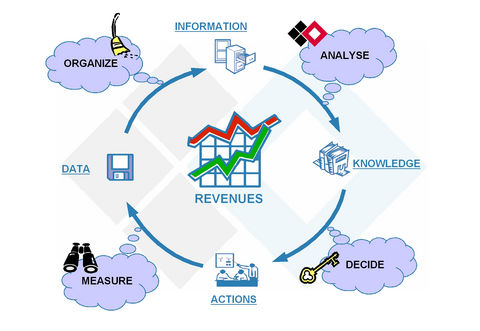
  •  Data mining is the process of extraction of interesting patterns or knowledge from huge amount of data.
  • Using information contained within data warehouse, data mining can often provide answers to questions. Like….
    • Which products should be promoted to a particular customer?
    • Which securities will be most profitable to buy or sell during the next trading session?

Application of data mining:

Here is the list of areas where data mining is widely used −

  • Healthcare
  • Finance
  • Retail industry
  • Telecommunication
  • Text Mining & Web Mining
  • Higher Education

Trends in data mining:

  • Application Exploration
  • Scalable data mining methods
  •  Combination of data mining with database systems, data warehouse systems, and web  database systems
  • Standardization of data mining language
  •  Visual data mining
  • New methods for mining complex types of data
  • Web mining

Application Exploration of Data Mining:

  • Earlier data mining was mainly used for business purpose, to overcome the competitors.
  • Data mining is gaining wide acceptance in other fields also. And many new explorations are being done for this purpose.
  • Data mining for business continues to expand as e-commerce and marketing becomes mainstream elements of the retail industry.

Scalable Data Mining Methods:

  • As data is expanding at a massive rate, there is a need to develop new data mining methods which are scalable and can handle different types and large volume of data.
  • The data mining methods should be more interactive and user friendly.
  • One important direction towards improving the repair efficiency of the timing process while increasing user interaction is constraint-based mining.

Combination of data mining with database, data warehouse, and web database systems:

  • Database, data warehouse, and WWW are loaded with huge amounts of data and are major information processing systems.
  • The desired architecture for data mining system is the tight coupling with database and data warehouse systems.
  • Transaction management query processing, online analytical processing and online analytical mining should be integrated into one unified framework.

Standardization of data mining language: 

Today few data mining languages are commercially available in the market like Microsoft’s SQL server 2005, IBM Intelligent Miner and many more…..

Standard data mining language or other standardization efforts will provide the orderly development of data mining solutions, improved interpret-ability among multiple data mining systems and functions.

Visual Data Mining:

  • The result of the mined data can be shown in the visual form So it will further enhance the worth of the mined data.
  • Visual data mining is an effective way to discover knowledge from huge amounts of data.
  • The systematic study and development of visual data mining techniques will promote the use for data mining analysis.

Web Mining:

web mining banner
  • The WWW is globally distributed collection of news, advertisements, consumer records, financial, education, government, e-commerce and many other services.
  •  The WWW also contains huge and dynamic collection hyper linked information, providing a large source for data mining.
  • Based on the above facts, the web also poses great challenges for efficient resource and knowledge discovery.

Need of Data Mining:

img 56ac4b0d825dd
  •  The massive growth of data from terabytes to perabytes is due to the wide availability of data in automated form from various sources as WWW, Business, Society etc….
  • We are drowning in data but deficient of knowledge Data is useless, if it cannot deliver knowledge.
  • That is why data mining is gaining wide acceptance in today’s world.


Awadhesh Kumar

Jain Software Developers


Cell Phone Jammer

Understanding Jammers: How They Block Wireless Communication

A cell phone jammer is a device designed to create a temporary “dead zone” that blocks all mobile phone signals in its coverage area. It works by disrupting the communication link between a cellphone and its base station, effectively preventing calls, messages, and data transmission.

While often associated with security and defense, jammers have a variety of applications ranging from law enforcement to sensitive public spaces where communication restrictions are necessary.


What Is a Jammer?

A jammer is an instrument that emits radio signals on the same frequencies used by mobile phones, radar, or radio systems. By transmitting these signals at sufficient power, the jammer interferes with or cancels out legitimate communication signals.

There are different types of jammers, including:

  • Cell phone jammers – Block mobile network signals.

  • Radar jammers – Interfere with radar systems used for detection.

  • Radio jammers – Disrupt radio communications.


Size and Types of Jammers

Jammers come in various sizes depending on their power and intended use:

  • Portable jammers: Small, handheld devices that may resemble a cellphone.

  • Medium-sized jammers: Briefcase-sized units used for specific security zones.

  • Large jammers: High-powered systems used by the police or military, often mounted on vehicles for convoy or perimeter security.


Why Are Jammers Used?

Cell phone jamming devices were originally developed for law enforcement and military operations to disrupt communications used by criminals or terrorists.

Today, they are also used in controlled environments such as:

  • Government offices and defense areas

  • Prisons and detention centers

  • Temples and places of worship

  • Educational institutions and examination halls

  • Public transportation systems

  • Industrial or chemical plants where radio transmissions can pose safety hazards

By blocking communication in specific areas, jammers help prevent information leaks, distractions, or unauthorized communications.


How a Jammer Works

A jamming device transmits radio waves on the same frequencies that mobile phones use to communicate with nearby cell towers. This is essentially a denial-of-service (DoS) attack against wireless communication.

Here’s how it works:

  1. The jammer broadcasts signals on mobile network frequencies.

  2. These signals collide with the cell phone’s connection signals.

  3. The interference causes dropped calls or prevents the phone from connecting to the network.

  4. The phone displays “no signal” or “network unavailable.”

As a result, all mobile communication within the jammer’s range becomes temporarily disabled.


Components Inside a Jammer

A jammer is made up of several key components:

1. Antenna

Every jammer includes an antenna to transmit interference signals.

  • In small jammers, antennas are built into the device.

  • In large jammers, external antennas are used to extend the range and target specific frequencies.

2. Power Supply

  • Portable jammers use rechargeable batteries, sometimes the same type used in mobile phones.

  • High-powered or stationary jammers are connected to standard electrical outlets or vehicle systems.

3. Circuitry

The core of the jammer consists of electronic components that generate and control interference signals:

  • Voltage-Controlled Oscillator (VCO): Produces the radio signal that disrupts communication.

  • Tuning Circuit: Controls which frequency range the jammer targets by adjusting voltage to the oscillator.

  • Noise Generator: Creates random electrical noise across specific frequencies to block signals.

  • RF Amplifier: Increases the signal power to a level that can jam nearby devices effectively.


Applications of Jammers

Jammers are widely used for both security and safety purposes. Some key applications include:

  • Law Enforcement & Military:
    Used to prevent remote detonation of explosives or to cut off communication between criminals and accomplices.
    Example: A cell-phone jammer reportedly prevented an assassination attempt on Pakistani President Pervez Musharraf in December 2003.

  • High-Security Zones:
    Installed in government buildings, prisons, or military bases to prevent unauthorized communications.

  • Industrial Safety:
    Used in environments like chemical plants or grain storage facilities where radio transmissions could ignite flammable materials.


Conclusion

Jammers play a vital role in ensuring security, privacy, and safety in sensitive environments. By intelligently disrupting specific communication channels, they help law enforcement and defense agencies maintain control and reduce risks associated with unauthorized or dangerous wireless communications.

However, it’s important to note that using jammers without authorization is illegal in many countries, as they can interfere with public networks and emergency communication systems. When used responsibly and lawfully, jammers remain a crucial tool for controlled communication management.


Written by:
Awadhesh Kumar
Jain Software Developers

Request a Free Estimate
Enter Your Information below and we will get back to you with an estimate within few hours
0