Official Blog

Introduction of Tripwire

Understanding Tripwire: A Reliable Intrusion Detection System

Tripwire is a powerful and reliable intrusion detection system (IDS) used to monitor and ensure the integrity of files and system configurations. It helps organizations identify unauthorized changes, detect potential security breaches, and maintain control over critical system operations.


What Is Tripwire?

Tripwire is a security and monitoring tool that checks for any unauthorized modifications in your system. It identifies, reports, and helps manage changes to ensure the integrity and safety of files and configurations.

The software continuously monitors key file attributes such as:

  • Binary signatures

  • File sizes

  • Related metadata

These values are compared against a known baseline database — a record of the system’s original, trusted state. Any deviation from this baseline may indicate a security compromise.


How Tripwire Works

  1. Baseline Creation:
    Initially, Tripwire creates a secure baseline database that stores the original attributes of important files, including their binary values and registry data.

  2. Monitoring for Changes:
    The software continuously checks for modifications in the system’s files and configurations.

  3. Detection and Reporting:
    If an intruder or unauthorized process alters a file, Tripwire immediately detects the change and reports it to the system administrator.

  4. Restoration:
    The administrator can review the report and revert the system to its original, trusted state using the baseline reference.

This process ensures that any suspicious activity is quickly detected and mitigated before it causes serious damage.


Where Is Tripwire Used?

Tripwire is widely used across various types of systems and network environments:

  • Tripwire for Servers (TS):
    Used to monitor and protect servers such as mail servers, web servers, firewalls, transaction servers, and development servers.

  • Tripwire for Network Devices:
    Helps secure network infrastructure including routers, switches, and firewalls.

    • Maintains logs of key actions such as adding or deleting nodes, updating rules, and managing user accounts.

    • Automatically notifies administrators about changes.

    • Supports restoration of critical devices.

    • Provides compatibility across multiple types of network devices.

Tripwire is an essential component of both Host-Based Intrusion Detection Systems (HIDS) and Network Intrusion Detection Systems (NIDS).


Tripwire Managers

Tripwire offers two types of management systems to monitor and control its functions:

  1. Active Tripwire Manager:

    • Updates the Tripwire database.

    • Schedules integrity checks.

    • Distributes and manages policy and configuration files.

    • Views detailed integrity reports.

  2. Passive Tripwire Manager:

    • Allows users only to view machine statuses and integrity reports without making changes.


Installing and Using Tripwire

To implement Tripwire effectively, follow these basic steps:

  1. Install the Tripwire software and customize the policy file.

  2. Initialize the Tripwire database.

  3. Run a Tripwire integrity check.

  4. Review the generated report file.

  5. Take corrective security actions if necessary.

  6. Update the database and policy file regularly to maintain accuracy.


Benefits of Using Tripwire

  • Enhanced Security:
    Detects and reports unauthorized changes immediately, helping to prevent potential breaches.

  • Accountability:
    Identifies and tracks the source of every change made within the system.

  • Visibility:
    Provides a centralized view of all changes across servers and network devices, supporting multiple platforms and vendors.

  • High Availability:
    Reduces troubleshooting time by quickly identifying issues and restoring systems to their last known good state.


Key Features of Tripwire

  • Generates detailed reports about:

    • Which files were altered

    • When the changes occurred

    • What specific information was modified

  • Can help determine who made the changes if properly configured.

  • Allows administrators to maintain complete control with real-time alerts.

  • Requires proper implementation and monitoring, ideally under a dedicated security or crisis management team.


Conclusion

Tripwire is a cornerstone of modern cybersecurity practices. By continuously monitoring file integrity and system configurations, it helps organizations prevent, detect, and respond to unauthorized changes. Whether deployed on servers or network devices, Tripwire provides the visibility, accountability, and assurance needed to maintain a secure and reliable IT environment.


Written by:
Awadhesh Kumar
Jain Software Developers

 

—

—


Web Based Mobile

The Mobile Web

Definition: The World Wide Web accessed through a mobile device such as :-

  •   cellular phones
  •   iPod Touch
  •   smart phone,
  •   Tablet,img 56a8557d516b0

Mobile phones that have Web capabilities can search the Internet from anywhere that the phone can get a signal. The cell phone is the desk top or lap top counter part.

History:

The first access to the mobile web was commercially offered in Finland in 1996 on the Nokia 9000 Communicator phone via, the Sonera and Radiolinja networks. This was access to the real internet. The first commercial launch of a mobile-specific browser-based web service was in 1999 in Japan when i-mode was launched by NTT DoCoMo.

Components of Mobile Web:

mobile programming

  • Users
  • Devices
  • operating systems and other software
  • Services
  • content
  • how users currently engage with information on the World Wide Web via their mobile devices.

USERS:Net generation

img 56a85726d755b

  • Grew up with computers and video games
  • Work in multimedia environments
  • Figure things out for themselves without consulting manuals
  • Work in groups
  • Are multi-tasking

Devices: (Mobile)ž

žThe mobile phones are the backbone of mobile communications. They have matured across four generations (1G, 2G 3G and now 4G)ž

Mobile Telephone:

A Mobile Telephone (also known as a Cellular Telephone) is defined as a ‘portable electronic device for the purpose of telecommunications over long distances.’

There are different kinds:

  •  Standard phones–multimedia phones that allow users to download music, ringtone, watch TV and videos and send multimedia messages.
  •   Smartphones( blackberry, Nokia N series) which are relatives of the PDA offer computing capabilities. These Include the iphone that presents whole Web pages via its safari browser.

PDA(Personal Digital Assistance):

PDA (personal digital assistant) is a term for any small mobile hand-held device that provides computing and information storage and retrieval capabilities for personal or business use, often for keeping schedule calendars and address book information handy.

Evolution of the Mobile Telephones:

The mobile industry currently offers 1G, 2G and 3G devices. 1G is   being phased out while 4G devices are still under development but   countries such as Japan and China are already using 4G technology.

img 56a8583be81d5

img 56a85852331b8

1G:

  •   The first commercially available cellular network using 1G standard   was introduced by NTT (Nippon Telegraph and Telephone) in 1979 in   Japan.
  •   1G (First Generation Wireless Technology). Is the analog, voice-only   cellular telephone standard, developed in the 1980s.
  •    It was invented by Martin Cooper of Motorola Corp in 1973.
  •   In 1G network, voice calls were simply modulated to a higher Frequency, typically to 150MHz and up before 1G technology was the mobile radio telephone or 0G (Zeroth G)
  • 1G phones could be cloned


2G-2.5G:

  • žThe second generation, 2G, was commercially launched for the GSM standard in 1991 by Radiolinja, currently known as Elisa Oyj, in Finland.ž
  • ž2G, voice communications were digitally Signal. This allowed for greater privacyž.
  • ž2G (GSM standard)—GPRS (General Packet Radio Service was introduced in) 2001.ž
  • žIt added packet switching protocols to mobile communications technology and TCP/IP thus making possible the reading and sending of e-mails, instant messaging (IM), and browsing the Internet. SMS or short message service is heavily used.
  • GPRS provided data transfer rates from 56-115kbit/s
  • 2.5 G added MMS.
  • So, services like WAP (Wireless Application Protocol) and MMS (Multimedia Messaging) were introduced, along with Internet services.
  • This is the most widely used generation of mobile telecommunication networks, and is what most mobile phones in India are now using.

3G-3.5G:

  • The third generation, 3G, was introduced by NTT(Nippon Telegraph and Telephone) DoCoMo in Japan, in 2001.
  • 3G used completely different radio frequencies from 2G
  • So it required different equipment to achieve the new high data transfer rates.
  • 3G data transfer rates are 384kbits/s to 2Mbits/s
  • So it allows for previously unavailable services like video calls, video conferencing, online conference call, mobile TV, online gaming etc. These speeds are broadband equivalent, so the applications and capabilities are enhanced greatly.

4G:

  • 4G—The fourth generation cell phone is being championed in Japan. It will boost the data rates to 20 Mbps. These speeds enable high quality video transmission and rapid download of large music files. The first 4G phones appeared in 2006.
  • Such speeds are not even present in wired networks commercially.

Services available in the mobile web:

  • E-books
  • Audio books
  • Mobile TV/Video
  • Travel Information
  • Browsers
  • News
  • Blogging
  • RSS feeds
  • Food ordering
  • Mobile Web quick piks
  • Iphone only
  • Iphone quick picks
  • Jobs etc.

Benefits of Mobile Web:

  1. Constant connectivity- always on

img 56a85ad6235bd

2. Location-Aware—have GPS (global positioning System)

3.Limitless access—Includes the whole Web

img 56a85bb89a16e

4.Interactive capabilities—Can receive and create content, make comments, take photos, write and post blogs, etc.

img 56a85ba45670e

Limitation:

Small screen size:-This makes it difficult or impossible to see text and graphics dependent on the standard size of a desktop computer screen.-

img 56a85b08db03a

Lack of windows :-On a desktop computer, the ability to open more than one window at a time allows for multi-tasking and for easy revert to a previous page. Historically on mobile web, only one page can be displayed at a time, and pages can only be viewed in the sequence they were originally accessed.

img 56a85b84c69b7


Navigation:- Most mobile devices do not use a mouselike pointer, but rather simply an up and down function for scrolling, thereby limiting the flexibility in navigation.

Lack of JavaScript and cookies :-Most devices do not support client-side scripting and storage of cookies (smartphones excluded).


Awadhesh Kumar

Jain Software Developers


What is Mobile Switching Center?

   Mobile Switching Center (MSC)

  • The MSC is responsible for handling voice calls and SMS as well as other services (such as conference calls, FAX and circuit switched data).
  • The MSC sets up and releases the end-to-end connection and hand-over requirements during the call and takes care of charging and real time pre-paid account monitoring.
  • In the mobile phone system, in contrast with earlier analogue services, fax and data information is sent directly digitally encoded to the MSC Only at the MSC is this re-coded into an “analogue” signal.
  • The BSS consists of the following network components:– 7BTS: Base Transceiver Station- BSC : Base Station Controller
  • The BTSs are connected to the different BSCs thorough E1s links, BSCs are connected in turn to one or more MSC.

Introduction:                                  

  • With the technological advances and a rapid growth of optical and wireless communication systems is being developed every day.
  • From economical point of view, the operator has to choose the most suitable communication system for the areas to be served.
  • Efficient deployment of appropriate communication system according to the topography (Topology), enhances the services, provides higher rate, and increases revenue.
  • The systems that may be used in providing telephony services to the rural areas and villages are outdoor optical fiber unit system ,wireless system.


Image result for gateway mobile switching center

Introduction of Access Network Topologies:

The Access Network (AN) is the physical connection between the core network and the subscriber terminals.

Classification of Access Networks:

  1. The wired line access method, utilizes copper wire cables, it is the conventional system. It is normally used for local networks at range of 5 Km maximum.
  2. The optical cable access. The fiber cable is connected to a   remote unit,this remote optical unit provides service to   the subscribers through copper wire. This system is used when communities are located apart from each other and far from the host exchange.

Network Topology:

  1. — Physical topology:  Actual layout of the media
  2. —Logical topology: —How the hosts access the media

Different types of physical topologies are used in MSCs:

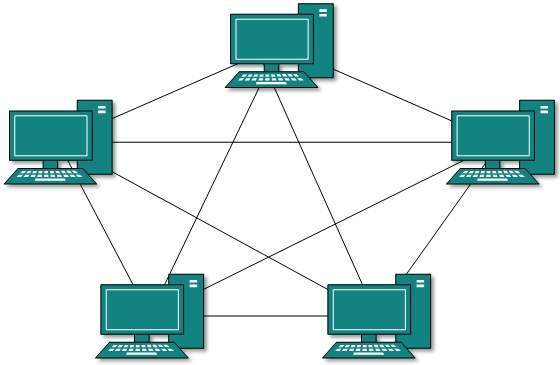
1.Mesh topology –

  • —Point-to-point network
  • —Every two communication nodes(MSC) has a dedicated connection
  • —Each pair of MSC performs communications independent of others
  • —The number of links(channels) increases fast as the number of nodes (MSC)increases

Number of links( L )

L = N(N ` 1) / 2

N:Number of nodes (MSC)——

mesh topology

Advantages:

  • Eliminate traffic problems because the link(channels) is not shared.
  • It is robust. If one link becomes unusable it does not incapacitate the entire MSCs.
  • Privacy and security due to dedicated line.
  • Point-to-Point link make fault identification and fault   isolation easy.

Disadvantages:

  • The amount of channels is very high.
  • Installation and reconfiguration is difficult.
2. Star Topology:

The network connection is arranged as a star.

  • All MSCs links to a WAN Switch.
  • The WAN Switch directs the message from the sender to its destination.

Each MSCs does not directly connect to others

img 56a707f74c779

Advantages:

  • Less expensive then a mesh topology.
  • Each device needs only one link(Channel) and one I/O to   connect it to any number of MSCs.
  • Easy to install and reconfigure.
  • Far less cabling is required than mesh topology.
  • Fault identification and fault isolation is easy.

Disadvantages:

  • More cables are required than Bus and Ring topology.
  • Single point of failure is WAN Switch.

3. Ring Topology:

  • Each MSCs links to its two neighbors in a circular   arrangement.
  • The “last” MSCs connects to the “first”.
  • The message travels along the ring and is transferred by each MSCs until it reaches the destination.

img 56a708b51a798


Advantages

  • A ring is relatively easy to install and reconfigure.
  • To add or delete a device requires changing only the connections.
  • Fault isolation is simplified.

Disadvantages

  • Unidirectional traffic is a big disadvantage.
  • In a simple ring, a break in the ring can disable the entire network. (But this can be solved by dual ring).

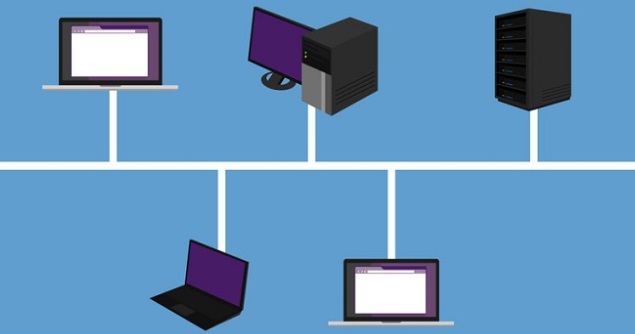
4. Bus Topology:

  • —All nodes link to a transmission cable, a shared bus.
  • —Any MSCs can send messages to any other nodes through the bus.
bus topology

Advantages :

  • Ease of Installation.
  • Uses less cabling than other topologies.

Disadvantages:

  • Difficult re-connection and fault isolation.
  • Fault or break in the bus cable stops all transmissions.

5. Tree Topology:

  • —An alternative form of star topology
  • —All the nodes connect to the central Switch, an active Switch.
  • —A node may be a MSCs or a LAN Switch.
  • —Each LAN Switch has a group of computers connecting to it.

    img 56a709b3c6b9e

Advantages:

  1. Expansion of Network is possible and easy.
  2. Here, we divide the whole network into segments (star networks), which can be easily managed and maintained.
  3. Error detection and correction is easy.
  4. Each segment is provided with dedicated point-to-point wiring to the central hub.
  5. If one segment is damaged, other segments are not affected.

Disadvantages:

  1.  As more and more nodes and segments are added, the maintenance becomes difficult.
  2. Scalability of the network depends on the type of cable used.


Awadhesh Kumar

Jain Software Developers


An introduction to AngularJS

Understanding AngularJS: A Powerful Framework for Dynamic Web Applications

AngularJS, often referred to as Angular or Angular.js, is an open-source web application framework developed and maintained by Google along with a community of developers. It is designed to make web development easier, more efficient, and more dynamic by extending the capabilities of traditional HTML.


What Is AngularJS?

AngularJS is a JavaScript framework that allows developers to build interactive, single-page web applications. It can be easily added to any HTML page using a simple <script> tag.

What makes AngularJS special is how it extends HTML attributes with powerful tools known as Directives and uses Expressions to bind data dynamically to the user interface. This means that the web page updates automatically whenever the data changes — without the need to reload or refresh.


Key AngularJS Directives

AngularJS uses a set of built-in directives that enhance HTML’s functionality:

  • ng-app: Defines an AngularJS application.

  • ng-model: Binds the value of HTML controls (like input, select, or textarea) to the application data.

  • ng-bind: Binds data from the application to the HTML view.

Here’s a simple example demonstrating how AngularJS works:

<!DOCTYPE html>
<html>
<head>
<script src="http://ajax.googleapis.com/ajax/libs/angularjs/1.4.8/angular.min.js"></script>
</head>
<body>
<div ng-app="">
<p>Name: <input type="text" ng-model="name"></p>
<p ng-bind="name"></p>
</div>
</body>
</html>

In this example, when you type a name in the input field, it instantly appears below — showcasing AngularJS’s real-time two-way data binding.


Why Choose AngularJS?

AngularJS has remained one of the most popular web development frameworks for several reasons:

  • MVC Architecture: It supports the Model-View-Controller pattern, which separates logic, data, and presentation for cleaner code management.

  • Declarative User Interface: Developers can describe what they want, and Angular takes care of how to make it happen.

  • Less Coding, More Power: You can achieve complex functionalities with less effort.

  • Behavior with Directives: Directives make it easy to create dynamic and reusable components.

  • Flexibility with Filters: Filters help format data before displaying it to users.


Alternatives to AngularJS

Other web frameworks also aim to simplify HTML’s limitations, but they often do so by completely abstracting away HTML, CSS, or JavaScript — or by providing more manual (imperative) control over the Document Object Model (DOM).
In contrast, AngularJS builds upon existing web standards while making them smarter and more efficient to use.


Advantages of AngularJS

Here are some of the main benefits that AngularJS offers to developers:

  • Templates: Simplify the creation of dynamic web pages.

  • Two-Way Data Binding: Keeps the model and view in perfect sync automatically.

  • Form Validation: Makes handling and validating user input easier.

  • Deep Linking: Enables dynamic pages to maintain state and navigation.

  • MVW Pattern (Model-View-Whatever): A flexible variation of MVC for better code organization.

  • Server Communication: Seamlessly handles data exchange with back-end systems.

  • Reusable Components: Promotes modular and maintainable code.

  • Localization Support: Makes it easier to develop multilingual applications.


Conclusion

AngularJS revolutionized the way developers build web applications by blending simplicity with powerful functionality. Its ability to bind data, manage complex UI elements, and reduce the amount of manual coding has made it a cornerstone of modern web development.

Whether you’re a beginner or an experienced developer, AngularJS provides the tools you need to create responsive, scalable, and efficient web applications.


Written by:
Awadhesh Kumar
Jain Software Developers


What is Space Mouse?

Introduction:

Every day of your computing life, you reach out for the mouse whenever you want to move the cursor or activate something. The mouse senses your motion and your clicks and sends them to the computer so it can respond appropriately. An ordinary mouse detects motion in the X and Y plane and acts as a two dimensional controller. Space Mouse is a professional 3D controller specifically designed for manipulating objects in a 3D environment.

img 56a314ea4da64

What is Space Mouse?

     Space Mouse is a professional 3D controller specifically designed for manipulating objects in a 3D environment. It permits the simultaneous control of all six degrees of freedom – translation rotation or a combination. The device serves as an intuitive man-machine interface.

An ordinary mouse detects motion in the X and Y plane and acts as a two dimensional controller but space mouse detect the X,Y and Z axis.

The space mouse has different modes of operation in which it can also be used as a two-dimensional mouse.


History:

Image result for space mouse plus

Space mouse is developed by the DLR institute of robotics and mechanics in 1990.

DLR:- Deutsches Zenturum far Luft-und Raumfahrt.

Working Principals:

Image result for space mouse plus


The basic principle behind its construction is mechatronics engineering and the multi sensory concept.

Movements were measured by electromagnetic or ultrasonic.

Whats is Mechatronics engineering?

Mechatronics is concerned with the design automation and operational performance of electromechanical systems. Mechatronics engineering is nothing new; it is simply the applications of latest techniques in precision mechanical engineering, electronic and computer control, computing systems and sensor and actuator technology to Design improved products and processes.

Image result for space mouse plus

2D vs 3D:

img 56a31632aa2f0

Types of Space Mouse:

img 56a3167a6c81a

    1. Space Mouse Classic

img 56a316a9eaf6d
2. Space Mouse Plus

img 56a316fa8397c

Space Mouse Features:

  •    Ease to use of manipulating object in 3D  applications.
  •    Calibration free sensor technology for high  precision.
  •    Nine programmable buttons for motion control.
  •    Setting to adjust sensitivity and user preference.
  •    Double productivity of object manipulation in 3D application.

Provide Facilities:

  • six-degrees-of-freedom (6Dof) sensor
  •   Quick ViewKeys
  • Rotation Toggle Key
  • Intelligent Function Keys
  • On-screen Display
  • Keyboard Modifiers (Ctrl, Alt, Shift, Esc)
  • Virtual Num Pad
  • 15 programmable keys in total

Application Area:

  • Object manipulation in 3D applications.
  • It is used in industrial robots.
  • Playing a Games.

Space Mouse Benefits:

  • Drawing times is reduced by 20%- 30% increasing overall productivity.
  • With the Space Mouse improved design is possible.
  • Earlier detection of design errors and cost savings in the design process.
  • Works without an additional power supply.

Space Mouse Limitation:

  • Heavy weight.
  • Very Expensive.


Google paying $1+ billion to Apple Inc


Google paying $1+ billion per year to keep Google search bar on iPhone

When Microsoft denied Google appeal to assign google search as default option on Windows operating systems ,Google made a deal with Apple and paying around $1+ billion every year .Payment also based on revenue generated from Google ads clicks from apple iphone devices .


Google Inc. took this step after getting sued from Oracle Inc. for using their java while developing android .


Special court ordered Google to pay part of revenue they generates from every partnered company on their projects .


Sohil Jain

Logical thinker !

Jain Software Developers

What is Holography?

History of Holography:

  • Invented in 1948 by Dennis Gabor for use in electron microscopy, before the invention of the laser.
  • Leith and Upatnieks (1962) applied laser light to holography.
holograms

Conventional vs. Holographic photography:

Conventional: 

  • ¨2-d version of a 3-d scene
  • ¨Photograph lacks depth perception
  • ¨Film sensitive only to radiant energy
  • ¨Phase relation (i.e. interference) are lost

Hologram: 

  • ¨Freezes the intricate wave front of light that carries all the visual information of the scene
  • ¨To view a hologram, the wave front is reconstructed
  • ¨View what we would have seen if present at the original scene through the window defined by the hologram
  • ¨Provides depth perception
past, present and future of holograms

Hologram Properties:

  • If you look at these holograms from different angles, you see objects from different perspectives, just like you would if you were looking at a real object.
  • They usually just look like sparkly pictures or smears of color.
  • If you cut one in half, each half contains whole views of the entire holographic image.
holography

Hologram Construction:

  • Laser : Red lasers, usually helium-neon (HeNe) lasers, are common in holography
  • Beam splitter: This is a device that uses mirrors and prisms to split one beam of light into two beams.
  • Mirrors: These direct the beams of light to the correct locations.
  • Holographic film: Holographic film can record light at a very high resolution, which is necessary for creating a hologram. It’s a layer of light-sensitive compounds on a transparent surface, like photographic film.

Hologram Working:

img 56a1bf300a4ab

Holography Reconstruction:

img 56a1bf80d102f

What is Laser:

Lasers produce monochromatic light — it has one wavelength and one color. Because of the need for coherent interference between the reference and object beams

laser pointerimg 56a1c0b62e383

Hologram:Some Applications:

  1. Authentication.
  2. Virtual Display.


Awadhesh Kumar

Jain Software Developers


What is Artificial Intelligence?

Image result for artificial intelligence

img 56a069824e658

Introduction:

  • Artificial intelligence(AI) is technology and a branch of computer science that studies and develops intelligent machines and software.
  • Here intelligent system means a system that perceives its environment and learn through experience like human beings.
  • In 1955, John McCarthy coined the term “Artificial Intelligence”.


Intelligence:

  • Intelligence is the ability to learn about, to learn from, to understand about, and interact with one’s environment.
  • Intelligence is the faculty for understanding.img 56a069c0caab3

“Intelligence is not to make no mistakes but quickly to understand how to make them good” -(German Poet )


Core Parts of AI:

  • Knowledge
  • Reasoning
  • Problem solving capabilityimg 56a06a0295a0e
  • Perception
  • Learning
  • Planning
  • The ability to manipulate and move objects

How does AI Works:

Artificial intelligence works with the help of :

  • Artificial Neurons   (Artificial Neural Network)
  • Scientific theorems (If-Then Statements, Logics)

http://guardianlv.com/jainglobal/uploads/2014/03/Robots-The-Possibilities-of-Artificial-Intelligence-650x406.jpg220px

What is Neural Networking:

Artificial neural networks are  composed of interconnecting  artificial neurons (programming constructs that mimic the properties of biological neurons).

Image result for artificial intelligence

Structure of Biological Neuron:

img 56a06bc6e1373
An Artificial Neuron:

img 56a06c17b8957

Turing Test:

  • The Turing testis a test of a machine’s ability to exhibit intelligent behaviour equivalent to, or indistinguishable from, that of an actual human.
  • The test was introduced by Alan Turingin his 1950 paper “Computing Machinery and Intelligence,”

Test Setup-

Person A (actually a computer) and Person B both say that they are human. Person C tries to find out whether Person A or Person B is the computer or the human.

img 56a06cbc8c68b

Examples of Artificial Machines:

  • Deep Blue was a chess-playing computer developed by IBM. On May 11, 1997, the machine, played chess with world champion Garry Kasparov.
  • MYCIN: is an expert system for treatment of blood infection.

Advantages:

  • It can help improve our way of life.
  • Use of robots for heavy construction, military benefits or even for personal assistance at private home.
  • There will be less injuries and stress to human beings.
  • Many of our health problems now have possible solutions with the use of Artificial Intelligence.
  • Scientists have been using AI to test theories and notions about how our brain works.artificial intelligence risk reward now labs

Disadvantages:

  • If robots start replacing human resources in every field, we will have to deal with serious issues like unemployment.
  • One of the major disadvantages of intelligent machines is that they cannot be ‘human’. We might be able to make them think. But will we be able to make them feel?
  • Apart from these concerns, there are chances that intelligent machines overpower human beings.

Awadhesh Kumar

Jain Software Developers

Gi-Fi Technology

https://mgitecetech.files.wordpress.com/2011/07/gifi.jpg


Introduction of GiFi:

  • GI-FI means gigabit wireless.
  • Worlds first transceiver integrated on single chip.
  • Operates on 60ghz on the CMOS process.
  • Allows wireless transfer of audio and video data at upto 5GB per second.
  • Transfer data within an indoor environment usually within a range of 10ms.
  • Man behind Gi-Fi is Professor Stan Skafidis of Melbourne university.

Evolution of GiFi:

img 569f16d7cae97

Why GiFi:

The reason for pushing into Gi-Fi technology is because of

  • slow rate,
  • high power consumption,
  • low range of frequency operations of earlier technologies i.e. Bluetooth and Wi-Fi’s.

Gi-Fi Access Devices:

img 569f17399373d


Application of GiFi:

  • In wireless PAN networks.
  • Inter-vehicle communication system.
  • Huge data file transfer.
  • Office appliances.
  • Video information transfer.

Awadhesh Kumar

Jain Software Developers


Light Fidelity Technology

Li-Fi: The Future of Wireless Communication Through Light

Present Scenario

The demand for wireless data is skyrocketing — doubling every year — as billions of connected devices, from smartphones to smart homes, compete for limited radio bandwidth. Traditional Wi-Fi and cellular networks are now facing congestion like never before.

This growing challenge raises a critical question:
What technology can meet the future demand for high-speed, secure, and interference-free wireless communication?

The answer lies in Li-Fi (Light Fidelity) — an innovative technology that transmits data through light instead of radio frequencies.


How Li-Fi Works

The concept of Li-Fi is simple yet revolutionary.

Li-Fi uses LED lights to transmit data. When an LED is on, it transmits a digital 1. When it is off, it transmits a digital 0. These rapid on-off light variations (which are too fast for the human eye to detect) form binary data signals.

A Li-Fi controller encodes the data into the LED’s light waves, and a receiver — such as a photodiode — decodes these light signals back into digital information.

Essentially, any space illuminated by LED lights can become a high-speed data zone, transmitting information seamlessly and securely.

All that’s needed are LED light sources and intelligent controllers to modulate the light.


Why Visible Light Communication (VLC)?

The electromagnetic spectrum offers many forms of energy, but only the visible light spectrum is ideal for daily, human-safe data transmission. Here’s why:

  • Gamma rays and X-rays are highly dangerous to human health.

  • Ultraviolet light (UV) can cause biological damage.

  • Infrared light (IR) is limited by eye-safety regulations and power restrictions.

The visible light spectrum — safe, abundant, and license-free — offers a clean and secure alternative.
This makes Visible Light Communication (VLC) the foundation of Li-Fi, paving the way for the next generation of wireless connectivity.


About Luxim (LAXIM)

Luxim, a clean-tech company based in Sunnyvale, California, was founded in 2000 and has been at the forefront of advanced lighting and Li-Fi solutions.
The company focuses on creating light-based technologies that are fast, reliable, and environmentally sustainable.

Luxim’s Li-Fi Products

  1. LIFI4KP – Designed for visible light applications such as microscopy, machine vision, and industrial inspection.

  2. LIFI4KT – A broadband source covering both UVA and visible light regions, ideal for precision lighting and scientific use.

  3. LIFI4KU – A mercury-based light source with strong UV spectral emission (down to 320 nm), used in UV curing, fluorescence imaging, and UV printing.

These technologies demonstrate how light-based systems can go beyond illumination — offering powerful, real-time data communication.


Potential Applications of Li-Fi

Li-Fi’s versatility opens up new possibilities across industries. Here are some key areas where it’s making an impact:

1. Smart Traffic Systems

Traffic lights equipped with Li-Fi can communicate with vehicles and nearby signals.
Cars using LED headlights and taillights can exchange data, preventing collisions and optimizing traffic flow — making roads safer and smarter.

2. Safe Industrial Environments

In sensitive zones like petrochemical plants, hospitals, and aircraft, where radio waves can interfere with equipment or pose hazards, Li-Fi provides a safe communication channel using harmless visible light.

3. Public Internet Hotspots

Imagine streetlights acting as high-speed internet hubs.
By integrating Li-Fi technology into street lamps, cities can create public data zones, offering connectivity wherever there’s light — a cost-effective step toward truly smart cities.


Conclusion

Li-Fi represents a transformational shift in wireless communication. By harnessing the power of light, it offers an ultra-fast, secure, and interference-free alternative to traditional Wi-Fi.

As research continues and infrastructure evolves, Li-Fi could soon redefine how the world connects — turning every beam of light into a gateway to the digital universe.


Written by:
Jain Software Developers
Central India’s Leading Software & IT Solutions Company
www.jain.software

Request a Free Estimate
Enter Your Information below and we will get back to you with an estimate within few hours
0